Silverlight 2 (RC0 / RTM) - Dynamic Assembly Loading Fix
If you are utilizing the dynamic loading of assemblies (component based architecture inside Silverlight) in Beta 2, you will be in for a nasty surprise when upgrading to RC0. Apparently, the way the Deployment class is utilized using a Singleton, it breaks some code you may have seen on several Microsoft blogs.
Specifically this line of code will fail with an InvalidOperationException ("Use the Current property to access the Deployment instance")
Deployment deploy = XamlReader.Load(appManifest) as Deployment;
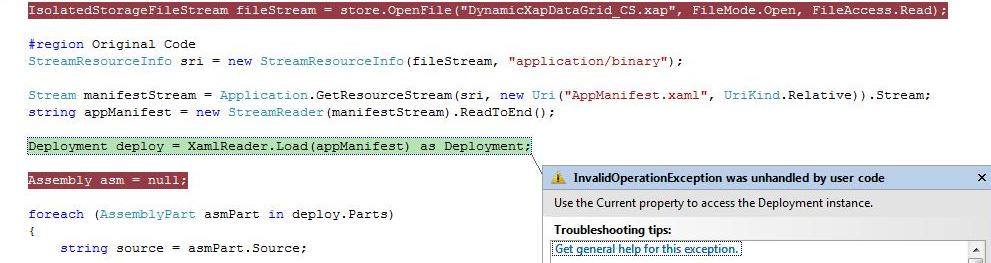
So what can you do? Luckily all the XamlReader load method does above is parse the AppManifest.xaml file and extract the deployment parts. We can use LINQ and do this manually.
// remove this, doesn't work in RC0 / RTM
//Deployment deploy = XamlReader.Load(appManifest) as Deployment;
Replace the code above with the code below. In my case, I am utilizing Tim Heuer's dynamic loading example and the xap file we are downloading dynamically includes a AppManifest.xaml file that looks like this:
<Deployment xmlns="http://schemas.microsoft.com/client/2007/deployment" xmlns:x="http://schemas.microsoft.com/winfx/2006/xaml" EntryPointAssembly="DynamicXapDataGrid_CS" EntryPointType="DynamicXapDataGrid_CS.App" RuntimeVersion="2.0.30523.6">
<Deployment.Parts>
<AssemblyPart x:Name="DynamicXapDataGrid_CS" Source="DynamicXapDataGrid_CS.dll" />
<AssemblyPart x:Name="System.Windows.Controls.Data" Source="System.Windows.Controls.Data.dll" />
</Deployment.Parts>
</Deployment>
The AppManifest.xaml file is part of the xap file (which is compressed). This file is a manifest of what assemblies are included inside the package. We simply need to get the string xaml and parse it using LINQ to XML.
IsolatedStorageFileStream fileStream = store.OpenFile("DynamicXapDataGrid_CS.xap", FileMode.Open, FileAccess.Read);
StreamResourceInfo sri = new StreamResourceInfo(fileStream, "application/binary");
Stream manifestStream = Application.GetResourceStream(sri, new Uri("AppManifest.xaml", UriKind.Relative)).Stream; string appManifest = new StreamReader(manifestStream).ReadToEnd();
// remove this, doesn't work in RC0 / RTM
//Deployment deploy = XamlReader.Load(appManifest) as Deployment;
XElement deploymentRoot = XDocument.Parse(appManifest).Root; List deploymentParts = (from assemblyParts in deploymentRoot.Elements().Elements()
select assemblyParts).ToList();
Assembly asm = null;
foreach (XElement xElement in deploymentParts)
{
string source = xElement.Attribute("Source").Value;
AssemblyPart asmPart = new AssemblyPart();
fileStream = store.OpenFile("DynamicXapDataGrid_CS.xap", FileMode.Open, FileAccess.Read);
StreamResourceInfo streamInfo = Application.GetResourceStream(new StreamResourceInfo(fileStream, "application/binary"), new Uri(source, UriKind.Relative));
if (source == "DynamicXapDataGrid_CS.dll")
{
asm = asmPart.Load(streamInfo.Stream);
}
Notice that instead of looping through the Deploy.Parts collection (foreach (AssemblyPart asmPart in deploy.Parts)), we are now iterating through XElements that are inside the <Deployment.Parts> elemt inside the AppManifest.xaml file. Next, we extract the source and we are able to load the assembly from that stream.
XElement deploymentRoot = XDocument.Parse(appManifest).Root;
List<XElement> deploymentParts = (from assemblyParts in deploymentRoot.Elements().Elements() select assemblyParts).ToList();
In conclusion, the Deployment class utilizes a singleton which breaks the XamlReader.Load method. Therefore, we need to tweak our code with a few lines of code in order to load assemblies dynamically.