Windows 7 - Should a developer invest in the upcoming OS?
- Introduction
- IIS 7.0
- 64-bit Computin
- Virtualization
- DirectX
- Windows Azure
- Conclusion
Introduction
Windows 7 is the next Windows version being released by Microsoft this year. It is already getting a ton of positive buzz from the community about how much better it is than Windows Vista in terms of performance and new features. However, looking at the features currently being announced for Windows 7, many of these appear to be visual tweaks and there aren't many new revolutionary features being added. This is why many people (including myself) feel that that Windows 7 feels more like a service pack to Vista rather than a new OS.
Microsoft not only adds features to the OS, but additional OS add-ons sometimes are only provided to the "current" operating systems. This is especially important for developers who rely on their development environments working properly on the operating system in which they decide to invest. Developers (especially web developers) also need to concern themselves with developing on workstation environments that have server equivalents. For example, Vista has IIS 7.0 and it is the server equivalent of the IIS in Windows 2008 Server.
Windows 7 builds on Windows Vista and its feature set. Therefore, when evaluating Windows 7, it is also important to consider the features Vista has added. Below is a list of items I came up with that I feel are important to developers working on the Microsoft platform. Obviously, depending on what you do, some of these things might be more important than others.
IIS 7.0 (Vista & Windows 7)
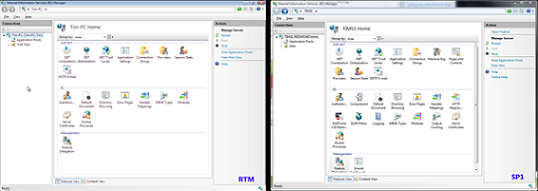
IIS is Microsoft's web server platform (If you don't know what IIS is, you probably got here by mistake). IIS in its early days was decoupled from the Operating System. However, since Windows 2000, Microsoft has essentially coupled the version of IIS with the OS offering. The current offering of IIS is version 7.0 and it offers a huge number of benefits over IIS 6.0. Version 7.0 is currently available for Vista, Windows 2008 and Windows 7 users. IIS 7.0 has its own team in Microsoft, and the team is actively rolling out new features in updates/service packs to the operating systems. These enhacements are geared towards the server operating systems; however, they need to roll the features into the workstation OSes (Vista, Windows 7) as well since not every developer can afford a "legal" license of Windows 2008 Server. A good example of this is Vista SP1 bringing IIS 7.0 features to match the server equivalent of Windows 2008 Server IIS 7.0. This is pretty important if you are targeting hosting your application in IIS 7.0.
Picture from Tim Sneath's article on comparing IIS 7.0 before SP1 (left) and after SP1 (right)
Why should you care about IIS 7.0? IIS 7.0 has huge performance improvements over previous IIS verions, security improvements, new features, etc. This article is not about how great IIS 7.0 is. Needless to say, it is a platform developers need to start considering more when designing their architecture/hosting strategies. Microsoft also recently announced a service release to IIS 7.0 which will be included in Windows Server 2008 R2. One of the key enhancements to this version is the ability to support multiple CLR versions at once (.NET 4.0). This will obviously be a big change that developers need to worry about. Furthermore, Microsoft announced during the PDC 2008 that some of the features of WCF 4.0/WF 4.0 will require WAS (Windows Process Activation Service). Therefore, having an OS that will support some of these features will be critical for developers to be able to develop, publish and test their work locally.
The question does remain: Will Vista get all of these new changes and get all future IIS enhacements or will they eventually be rolled into Windows 7 only? There is a service pack 2 slated for Vista later this year. So my guess would be that it's safe to assume that the recently announced service released to IIS 7.0 (7.5 ?) will probably be rolled into that service pack for Vista.
Important Note: You do have to be very careful which version you purchase of Vista/Windows 7 in order to enjoy all the benefits of IIS 7.0 on a workstation OS. This is a good link to the features in IIS 7.0 available on Windows 2008/Vista. As you can see, the Ultimate/Business versions of the OS pretty much have all the features that Windows 2008 IIS 7.0 offers.
64-bit computing (Vista & Windows 7)
64-bit versions of Microsoft's products have been around for a while now. However, older 64-bit OSes (i.e., Windows XP) gained little traction because of limited driver support and the hardware back in 2001 was limited in 64-bit offerings. This has all changed recently because almost every recent server/workstation hardware is 64-bit compatible. Furthermore, 64-bit OSes are much more stable and have a greater range of support. Vista and Windows 7 do a great job of supporting 64-bit on a workstation.
The biggest benefit of running a 64-bit OS is that you gain more addressable memory and can actually utilize more than 4 gig on your laptop/workstation. This can be a huge performance boost if you're running memory hogs like IIS, virtual machines, SQL Server, etc. Furthermore, certain enterprise applications love what 64-bit offers. For example, some of the tests I ran on SQL Server 2005/2008 show that 64-bit vs 32-bit gains an extra 10-15% in performance. For people who run really large systems (i.e., data warehouses with large amounts of data), this can add up to minutes/hours of processing time saved.
64-bit is the current platform for enterprise applications. There is no extra cost for the 64-bit premium and as I mentioned before, almost all current hardware is already 64-bit compatible. Application architecture seems to be the only road block preventing 64-bit adoption and it is a no-brainer for new projects. This is also important as some of Microsoft's enterprise applications are 64-bit only (i.e., Microsoft Exchange) and in the near future, this trend will continue. I could see some version of SQL Server/WCF/WF/Biztalk in the near future to be only available for 64-bit processes, and you do not want to have a development environment that can't handle it.
Virtualization (Vista (basic) & Windows 7 (full))
Virtualization used to be a buzzword a couple of years ago. Now its benefits are coming into fruition big time via enterprise support and implmentations. I remember a few years ago being at the SQL Server 2005 launch event and noting how Microsoft stressed that all their presenters were presenting for the first time with the same exact Virtual PC image. The beauty of this was one single image set up properly with all the necessary demos was distributed to all the presenters and all they had to do was fire it up and they knew exactly where everything was (no self-installing or maintaining their own software). This is a trivial example of how virtualization can help a company succeed in delivering a conference; but virtualization's key benefit: isolating environments and making them deployable to multiple workstations.
Windows 2008 Server x64 allows you to host Microsoft's software virtualization implementation called Hyper-V. What makes Microsoft's virtualization offering unique is that it is essentially a free add-on ($27.00 extra per OS license) to Windows 2008 Server rather than a hardware/software investment from vendors like VMWare. Vista SP1 does allow you to manage Hyper-V with an add-on and this obviously allows you to connect/manage different virtual image settings.
However, Windows 7 will take virtualization to the next level. Anyone who has played with Microsoft virtualization offerings can note that local images are stored as VHD files. Essentially, what users have done before is they have been able to copy this VHD file and load it almost like an application from their current OS. The downside of course is that your main OS has to allocate its share of resources and the image takes up a lot as well. In Windows 7, users will be able to directly boot to a VHD bypassing loading their main OS. It will be essentially like having another OS partition available (only this one will be virtual).
If Microsoft can streamline the configuration and booting process, this will be a huge win for them in the virtualization space. Microsoft already releases a lot of their beta products with virtual machines. A great example of this is the Visual Studio 2010 (.NET 4.0, VS Studio, C# 4.0, WCF 4.0, etc.) image. The entire environment is already pre-installed for you and ready to go for you to test out. This example can be taken much further. In your specific companies, you can deploy full-blown developer environments to their local workstations with all the software pre-configured. I always have these conversations with developers; "works here fine" or "blows up on this machine, don't know why". Having the ability to create and isolate a development environment correctly once and deploy it to all your developers is a big win for productivity. Vendors like VMWare already allow you to do this; however, with Windows 7/Windows 2008, the ROI of virtualization will be far greater.
Windows 7 and Windows 2008 have kernel enhacement changes made to their OSes, so they understand running hyper-v/virtual images without loading the whole OS. Windows 7 developers won't have to load an entire OS and then load a large image and carve out large amounts of resources to run that VM (i.e. 2 gig of RAM). This should make running virtual images very performant and a very attractive way to distribute external/internal development environments.
DirectX (Vista and Windows 7)
For Gaming & Multmedia Development
DirectX is a set of APIs offered by Microsoft for multimedia and game programming. DirectX is a good example of how Microsoft gets into the game and simply crushes the competition. Since the last few versions, there is no other framework that includes all the multimedia features that DirectX does.
Well before Vista's release, Microsoft was touting how they were adding a new fresh DirectX 10.x that was fully re-written and I heard interviews with product managers claiming 50% performance improvements. Seemingly, just like everything in Vista, this fell well short of the enhaced expectations. Since then, Microsoft announced DirectX 11 which will be available for both Vista and Windows 7 OSes. DirectX 11 is really exciting because it includes true multi-threading support (I was really suprised that DrectX 10.x doesn't do this really well). This is probably going to be the biggest performance boost to gamers: All higher-end gaming rigs are now quad core (or better in the future) processors.
If you are not a game/multimedia developer, you probably don't care about this too much. However, if you are in the gaming industry, this is obviously a cornerstone of picking the proper development OS. However, having said that, what true hardcore developer isn't a gamer at heart? I know that right next to all my SDKs and APIs, I have just as many cutting-edge games installed. Crysis on my 2560x1600 30" monitor looks really nice :)
For WPF
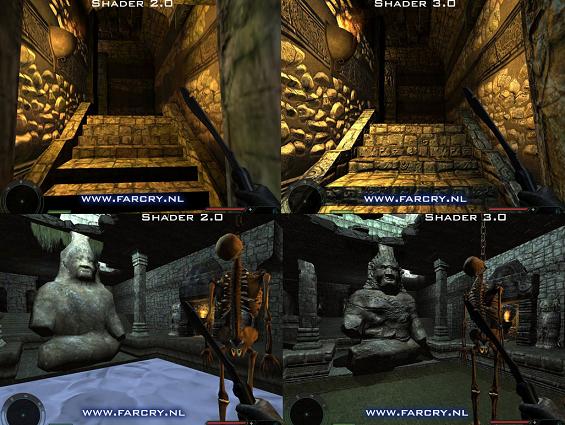
WPF for example leverages DirectX as its rendering engine for some of its tasks. I am not sure how this will progress as new versions of WPF materialize (.NET 4.0). But it is probably safe to assume that some of the effects/shaders you will be able to use in WPF will probably rely on DirectX specific versions. A good example of this is the WPF Effect Library which uses the DirectX engine's pixel shaders for some neat effects. Currently, you do not need Vista/Windows 7 to execute these effects. However, DirectX 10.x includes Pixel Shader 4.0 and DirectX 11 includes Pixel Shader 5.0. Obviously, as the pixel shaders include more capabilities, it is safe to assume some of these effects will be consumed by WPF. Therefore, you will eventually need a higher level shader in order to do some of the more advanced effects.
Clear example of Pixel Shader advances (2.0 vs 3.0)
This is also something to note for Silverlight developers as in Silverlight 3 we are supposed to get "hardware" acceleration and 3D support. The easy way to achieve this is by using DirectX engine under the covers. However, for compatibility, this would probably kill a lot of Silverlight's features on a Mac. I don't know if there is more information on this, but it is something to look out for if you are a WPF/Silverlight developer.
Windows Azure (Windows Vista & Windows 7)
Windows Azure is Microsoft's Web/Cloud OS that was announced at the PDC 2008 in October. Windows Azure combines cloud storage in Microsoft DataCenters with several enterprise services. Applications created for Windows Azure can be consumed via the web or on the desktop/mobile devices via an Azure client. This is not meant to be an intro to Azure; however, if you want to quickly get a high level understanding of what Azure is all about, I recommend checking this article out: Windows Azure - Breaking It Down.
To get started with Windows Azure, you need to install the Azure SDK (The full version is currently under private beta). The catch is that you need Windows Vista SP1 in order for this to work. There is a great thread here that explains the details, which essentially boils down to having certain IIS 7.0 processes "simulate" the cloud environment. Included there is also a link from someone who was able to get it to work on XP. Obviously, the supported version is only for Windows Vista SP1 currently (and eventually Windows 7).
Note: Windows Azure is a brand and what it will exactly include is still up in the air. Not everything is based in Azure. For example, certain parts of Azure and features like Live Services DO NOT/will not have a requirement of Vista/Windows 7. However, trying to guess what those items are months before Azure is released is anybody's guess (maybe except at Microsoft). Microsoft is moving more and more things into the "service offerings". For example, last week (January 23rd) Microsoft announced that the ProClarity BI product (which allows end users to build Dashboards/Analytics/Scorecards) will essentially be moved as a service under SharePoint. Maybe Microsoft offers a similar service for Azure developers (?)...kind of how Google allows users to use analytics/BI for Google Analytics.
Other
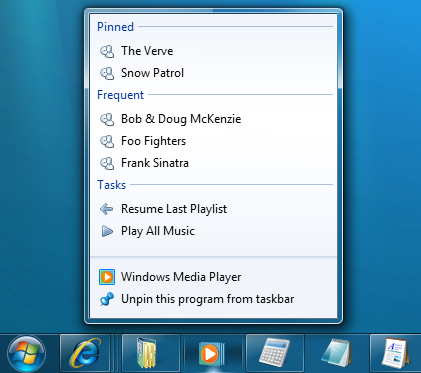
There are obviously numerous other examples and productivity enhancements included with Vista and Windows 7 for developers. Windows 7 performs much faster than Vista in most benchmarks. It will include a new TaskBar which is programmable for minimizing clicks, etc. If you are a driver/SDK developer for a particular OS, having the OS installed is obviously a no brainer in these kind of situations. Windows Vista also includes additional cryptography enhacement. All these things are important; however, they seem to be geared towards a smaller developer audience.
Jump Lists in Windows 7 (imagine Visual Studio 2010 or other dev products with nice lists)
Conclusion
Windows 7 is going to build on a lot of features that Vista already includes for developers. Many of these features already exist in Vista and Windows 7 will merely enhance them. If you are working with Vista, you can take advantage of many of these features. Development shops on Windows XP need to seriously evaluate their upgrade paths for their next OS. Vista is a good choice if you want to get started on any of these new upcoming technologies (i.e., Azure). However, waiting for Windows 7 might be a better choice as it will extend the next time an upgrade is required in the OS lifecycle. Windows XP is clearly showing signs of a "semi-supported OS". Microsoft likes to suppport the latest two versions of any product. Once Windows 7 comes out, developers have to be very cognizant of this that the new upcoming beta/SDK might simply not work in their Windows XP environment.
Windows 7 - Should a developer invest in the upcoming OS?
Windows XP or earlier: You need to plan for this accordingly as XP will be missing some big features geared toward .NET developers in the short term. Upgrading to Vista/Windows 7 is largely a personal choice (if a consultant) or a corporate choice (if on a work computer). Not upgrading to a "current" OS also presents the developer with the danger of any new upcoming SDKs or even the .NET framework future versions not being supported.
Windows Vista: Windows 7 simply enhances some of the features previously introduced in Vista. If you are on Vista, you won't gain much as a developer in terms of pure features. However some of the virtualization, performance and possible IIS 7.5 extensions might warrant an upgrade at least on your second development environment.
Note: Uses who purchase a computer with Vista after July of 2009 will get a free upgrade coupon for Windows 7. Furthermore, I recommend any developer to attend Microsoft's launch events. I have gotten a couple licenses of Vista Ultimate this way, they are given away to attendees for FREE amongst other software. Microsoft recently started giving away software (full versions) about 3-4 years ago at their events.
Silverlight 3 - What we Know So Far & What We Can Predict (Part 3 of 4)
Silverlight 3 Platform Stack - Part 3
Part 1 - Silverlight 3 Announced Enhacements
Part 2 - Silverlight 3 Development Stack
Part 3 - Silverlight 3 Integration with the Microsoft OS and Platform Stack
Part 4 - Silverlight 3 vs Flash and the iPhone
In Part 1 of this short series, I looked at what we know so far about Silverlight 3 from what has been announced by Microsoft. In Part 2 of this series, I take some educated guesses as to what and how Silverlight 3 will be released in relation to the development environment. In Part 3 of this series, I am going to take a look at the upcoming Silverlight 3 platform stack and how it will evolve to push Silverlight as THE leading RIA for business applications.
A little history/background about .NET in relation to Silverlight
For those not familiar with .NET or those who have not been programming in .NET until recently, this will be some good background information that will set the precedent for a lot of my platform predictions. .NET was formally released by Microsoft as a developer platform back in 2002. In those days, a lot of top gurus argued that .NET 1.x was not really adding any value to the development experience. The arguments were that it wasn't really revolutionary and a lot these concepts had been done before (and were being done better by other languages like Java). Some predicted that .NET wouldn't even be able to compete with Java and Microsoft was yet again copying rather than innovating.
A few years changes A LOT :) Java is way behind in language features compared with .NET and .NET now is everywhere in the Microsoft stack. How did this happen? What many naysayers failed to see was Microsoft is more than just a software company with a couple of products. They offer products that range from mobile phone apps to platforms that run the biggest companies in the world. This is the exact way that .NET CLR went from a simple developer language/framework to being the core runtime across the board at Microsoft (Yes, I know MS still uses C/C++ for OS/SQL, etc). Seemingly all new applications are written in .NET and many of the older C applications all have .NET level based APIs. What does this mean? This essentially means that if you want to extend/enhance/be more productive with the Microsoft platform, you will most likely be utilizing the .NET CLR. A lot more can be written about this, however this core concept of how Microsoft made .NET a huge success plays into on how I think Microsoft can make Silverlight technology the premier RIA technology.
Silverlight 2 Current Platform vs Silverlight 3 Possible Platform
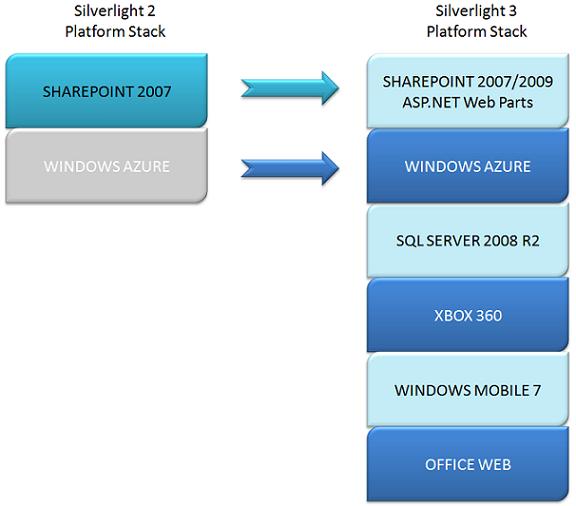
As you can see, Silverlight 2 (released in October 2008) has a limited platform stack. As of today, SharePoint 2007 content can be extended with Silverlight 2. Furthermore, the Windows Azure SDK (in private beta) supports the Silverlight 2 environment. I added it in a slightly different color because it has not been formally disclosed whether Silverlight 2 or Silverlight 3 will be the fromal version for Azure. Note: For those that do not know, Windows Azure is the Microsoft Cloud OS announced at the PDC 2008. On the right-hand side, you see my predictions as to where Silverlight 3 will expand. I am going to go through each item and list my predictions as to how Silverlight can be used.
SharePoint & Web Parts
SharePoint
SharePoint is Microsoft's collaborative platform. The current version of the platform is SharePoint 2007 (which extends the free WSS 3.0 that comes with Windows Server OSes). It was announced SharePoint was the fastest Microsoft product to grow into $1 billion in revenue. Many businesses are installing SharePoint to place their internal documents, HR, financial/accounting, business intelligence, etc., systems into one consolidated portal. SharePoint allows for a rich programming model with WorkFlows, SharePoint Designer, web parts and other APIs. This allows developers to provide custom content that might not be available OOTB or via 3rd party solutions. One of the ways you can extend SharePoint is with web parts using the web part framework.
SharePoint is all about sharing data easily with a simple drag & drop (no programming) interface. Right now a lot of the data exposure objects are essentially derivatives of ASP.NET grids presented nicely with Ajax magic. For the most part, they work really well and are highly performant. However, they could definitely benefit from some Silverlight integration. For example, filtering/sorting/uploading documents can be brought down to the Silverlight client and improve the interactivity and performance.
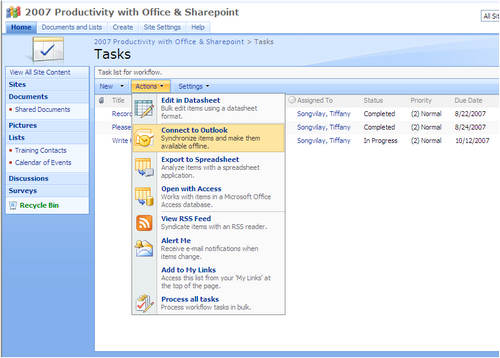
Web Part Framework
The web part framework was introduced in ASP.NET 2.0. This allowed ASP.NET developers to introduce portal/modular functionality that started becoming more popular with Web 2.0. The web part framework was also introduced into SharePoint 2007 as well and the same API can be used to create web parts. The Web Part Framework allows you to create web parts for both SharePoint and/or native ASP.NET. You have an option to use the web part class from either the SharePoint framework or the ASP.NET framework. The nice thing about using the ASP.NET framework web part class is that it will work in both SharePoint and ASP.NET, while using the SharePoint class limits your web parts to only work in SharePoint. I prefer to use ASP.NET web part base classes as it gives you much more flexibility and the SharePoint web part classes only give minimal additional features.
Silverlight & SharePoint/Web Part Framework
The nice thing about web parts is that they can use a number of different technologies. They can use plain vanilla HTML code. They can use ASP.NET controls with postbacks. They can use a combination of Ajax capabilities. Obviously, they can be extended to us Silverlight as well. This is a real powerful extensibility, as you can write a Silverlight application/module with minimal design considerations for SharePoint. A web part wrapper can be written for the Silverlight web part that essentially consumes the XAP file and integrates with the web part framework. This can add capabilities such as personalization properties, consume SharePoint lists/libraries, web part connections, feature deployment, etc.
Silverlight & web part design
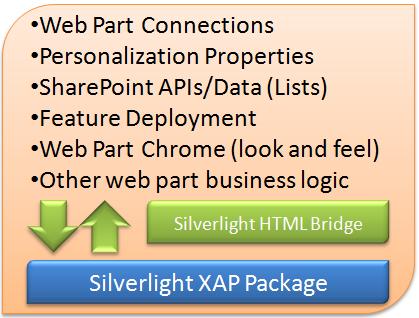
Essentially, we can write a Silverlight application, create a new project that references the Silverlight XAP file and use the Silverlight HTML bridge (C#/JavaScript) to link the Silverlight application and the web part framework features. In Silverlight 2, a lot of this code right now is manual and unless you know Silverlight/web part framework rather well, this could be a daunting task. There are a couple of projects out there that do some of the backend work for you. One is the Microsoft sponsered SharePoint BluePrints on CodePlex. Another good framework is the SilverPart also hosted on CodePlex.
Now you can provide a very rich UI for your SharePoint data
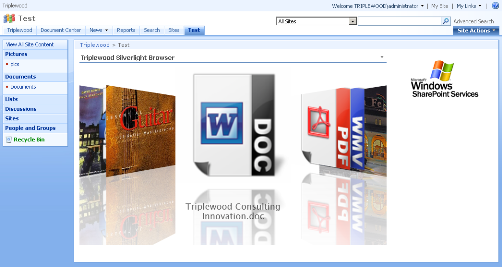
This is very powerful extensibility of SharePoint to essentially add RIA. Of course, you could have done this Flash/Flex; however, you can write everything in one single .NET language, single environment and a consolidated development environment. The next version of SharePoint or Silverlight 3 will probably get formal support for SharePoint. It would be pretty cool if you could simply just point to a Silverlight XAP file that implements an interface for basic communication and everything just worked. Hopefully, in the near future we get this functionality. Furthermore, Silverlight web parts provide additional features like "low postback design" and can offload some of the processing on the client thereby improving performance.
Windows Azure
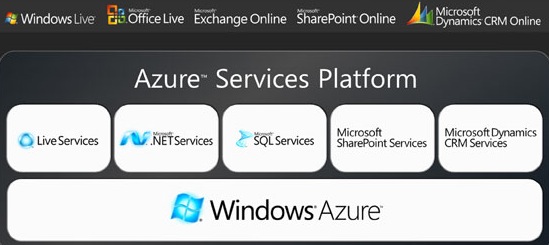
Windows Azure is an OS from Microsoft announced recently at the PDC 2008. The unique thing about Azure is that it is a "cloud OS". This means all the services, data and all the backend "stuff" lives in Microsoft data centers. Windows Azure is compromised of several services that work together and make up the total platform. Currently, the Windows Azure platform is in beta and you can request an SDK to write Azure enabled applications.
Services that make up the Azure platform
Silverlight and Azure
Cloud computing is the new buzzword in the industry. This has been done by other vendors, even very well like Amazon's S3 service. Microsoft (like always it seems) is late to the game. However, Microsoft as a latecomer has to do things a little different. A few things that make Microsoft's venture into cloud computing unique is that several of these services that make up Azure are first class services from enterprise products (SQL Server, SharePoint, Dynamics CRM). Powering all of this is the .NET framework. However, one uniqe aspect is that Microsoft also owns UI technologies like ASP.NET, Silverlight, WPF, and Surface that can be used to display these cloud services. Silverlight's small footprint and being a web plug-in play a big part in it being a great choice as a UI.
Upcoming Live Mesh Applications can use vanilla Ajax or Silverlight Web Applications
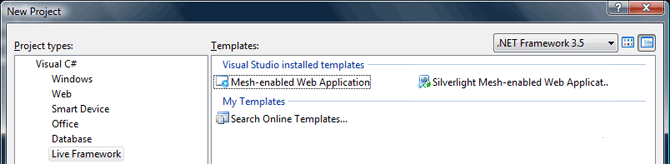
Jonas Follesoe has a great article on creating a Silverlight application in the "cloud". Furthermore, this also moves the "fit client" (i.e., Adobe AIR) rumor from a probably to highly likely for Silverlight 3. I can't stress how much different this is from other cloud computing initiatives by the other big players. Microsoft has an entire UI technology that differentiates itself from simple data storage like Amazon and it has the power of mature platforms like SQL Server, SharePoint and Office running some of the service offerings.
"No current player in cloud computing has this combination of a mature development framework (.NET), desktop-like UI (Silverlight), mature services (SQL Server, SharePoint, Office) and data storage"
What is really nice about Microsoft's initiative is that going from an idea or business concept to going live on a fully scalable framework that can reach millions is really simple now. During web 1.0, a lot of money had to be invested in the web infrastructure and this is why startups that were global had to raise tens of millions of dollars to just start up. With web 2.0, hardware became cheaper and a lot of companies actually could afford to completely outsource all of their server maintenance to a host provider. A very good example of this was YouTube, who at the time of being bought by Google had approximately 300 servers on RackSpace. With Web 3.0/cloud computing, this is further abstracted as you are not hosting on "servers" from a development perspective. As a cloud developer, you are writing these services and they are materialized somewhere on the server but you don't really care about it. Not having to worry about OS/hardware intricacies directly obviously makes creating applications much faster.
SQL Server 2008 R2/2010
SQL Server 2008 was released last year and not many additions were made to the tools which are largely based on the tools rewritten for SQL Server 2005. For those that work with the full SQL Server stack, it is a lot more than just a place to store your data. SQL Server comes with rich Busines Intelligence, Reporting, Data Transformation capabilities, etc. A lot of competitors and non-database vendors have moved ahead of Microsoft in the end user tools area. Microsoft tools are largely geared towards the developer and this needs to change. Some of the examples we see that Microsoft is seeing the pressure in this regard is the new user friendly Report Builder in SQL Server 2008 or the new self-service Business Intelligence application that Microsoft is planning for the next version of SQL Server, codename Kiliminjaro/Gemini. I think Microsoft can add Silverlight in key areas of SQL Server and catch up or pass competitors in these areas.
Charts & Graphs (make them interactive with Silverlight 3)
You can make pretty charts in SQL Server 2008, but wouldn't it be cool if they were Silverlight based and highly interactive?
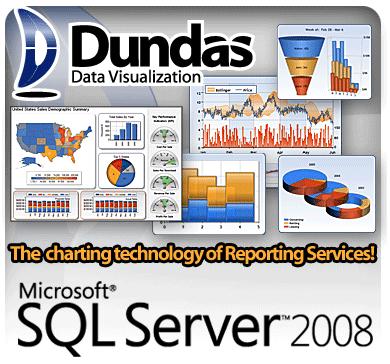
SQL Server 2008 currently allows you to create rich reports using Dundas Visualizations. These visualizations are nice but they are highly static (no animations or interactivity). Competing vendors like Panorama have added Flash charting capabilites to their end user reports which are animated, interactive, spacial, etc. This is an area where I see Silverlight being added to enhance products like Reporting Services, Report Builder or PerformancePoint Server. That would be a real powerful addition to the SQL Server stack.
RIA charts for your data

Interactive Dashboards
If you have done any kind of business intelligence development, dashboards are a great way to present a huge mountain of data in an easy-to-understand way. There are different types of dashboards with distinctions on their intended audience (i.e., executives) or their functionality (i.e., what-if scenarios). There are products by other vendors that can tie to SQL Server data and do this already. One great product is offered by Business Objects called XCelcius . This product allows executives or senior management to answer questions like, what happens to my margins if the cost of fuel goes up 20%? The person can get the answer immediately and not have to drill down or reference other reports or data sets. It is real powerful information. Evolving a product like this into Silverlight makes perfect sense.
What-If profitability analysis in Business Objects XCelcius (Click the picture to try the demo out)

You can write applications like this right now in Silverlight and tie it via services to SQL Server. However, this requires a significant development effort. It would be much easier if this were a simple drag and drop feature inside SQL Server Report Builder. Adding Silverlight 3 in key places to SQL Server can bring the data to life and make it a lot easier for end-users to consume, analyze and deliver insight.
XBOX 360 & Zune
The XBOX project is finally starting to pay off for Microsoft. While it is being outsold by the Wii, it is beating the Sony PS3 handily. The XBOX 360 has probably one of the best online experiences and the online arcade is great. It is the only major console that allows hobbyist developers to add their own games via the XNA Framework. The concept of Microsoft spreading .NET everywhere rears its head here. Recently the 3.0 version of the XNA framework allows developers to publish their games to the Zune as well. While it is nice that hobbyists can post their games on the XBOX arcade (after it is verified by the community) and make some money off of the game, they are still geared towards the young male audience.
Apple has perfected the micro/casual game devliery and micro payments on the iPhone
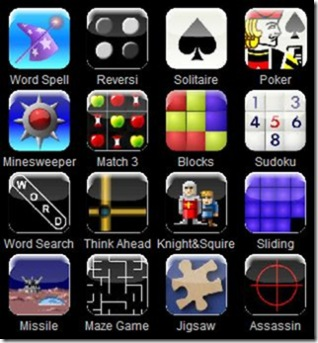
The iPhone market has really opened up the ability to deliver a new genre of games to the mobile market. These games are simple and they cost usually very little compared to large console alternatives. Apple has a huge opportunity here and is gearing up to take on Nintendo, Sony and Microsoft in the gaming market from a different angle, and there are some articles already creeping up about new GPUs and multi-core firmware which could add significant processing power to the iPhone. On the web you can see sites like http://www.miniclip.com or http://flashgames247.com/ that get millions of hits per year that target the casual games. If you have an iPhone or have visted these sites, these games are not really complex, offer any revolutionry AI or have breathtaking graphics. However, these games do provide one key feature and that is delivering quick entertainment on the spot. Furthermore, casual gaming has a much larger audience than your 12-28 year old male that can include families, older generations and - dare I say - women :)
In Part 1 of the series, I wrote about Silverlight 3 heading for mobile devices. Couple this with the Azure framework and you have a technology that can be used to compete with Apple and in the casual gaming market. Look at how popular games like Rock Band or other party games bring families and/or friends together. These types of casual games that can be delivered to the user via the XBOX brand have a huge potential. Silverlight 3 is gearing up to be faster via rendering, hardware acceleration and adding 3D support. Microsoft is one of the leaders in the gaming arena and with the Xbox brand name, it can expand its market into micro/casual games with Silverlight 3.
"Silverlight 3 as a potential gaming framework is a perfect alternative to the current Apple iPhone model that can reach audiences on the web, Xbox 360, Zune and mobile devices."
Note: In Part 4 of my series, I will look at how Microsoft shapes up competively against Adobe and Apple in this space.
Windows Mobile 7
Windows Mobile is one of the less successful product lines being offered by Microsoft. In terms of innovation and market share, it is far behind the leaders. Even when Microsoft is not a leader in the mass-market, it makes up for it in the corporate market but not for mobile devices. Blackberry is way further in the game. I made the jump as well. I moved from my Windows Mobile 6.x phone in favor of an iPhone recently and love it. Having said that, Windows Mobile 7 is promising to be multi-touch and feature a full browser and essentially compete with the iPhones and BlackBerries of the world.
Silverlight fits the mobile world real well. Anyone who has an iPhone has enjoyed the ease and power of the AppStore. For users, it's great. You have access to thousands of applications which are very reasonably priced (fall into the micro-payment category). However, for developers and app publishers, it's a whole different game. Apple only provides SDKs on the Mac platform. You have to program in their language/framework and they JUST recently lifted the NDA on being able to talk about iPhone programming....a big WTF :) Apple also vehemently opposes Flash to be installed on the iPhone. Many people wrongly assume it's a technology obstacle. It's more of a "owning everying on the iPhone" model. If Flash can be run on an iPhone and I come up with a stupid FlashLight app for $.99, Apple doesn't get its cut and you also bypass the "store firewall" called iTunes.
Some screens of a Windows Mobile 7 Theme (from screens that were leaked)
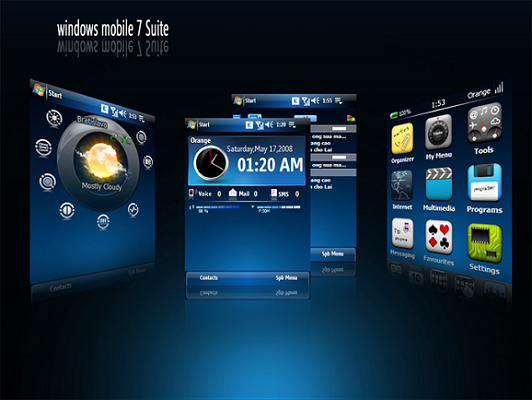
Silverlight on a Windows Mobile 7 platform can do a couple of big things: by providing an open development platform analogous to the AppStore and enabling many web apps to be run on a mobile phone. If Microsoft pursues this route, they can very easily gain a lot of users. That is one of the nice things currently about Windows Mobile. You can go out to a third party site and download an application and off you go. It does sacrifice in ease of use because of needing to install the application while being connected to your PC. Silverlight 3 being a web plug-in obviously changes all this. Furthermore, it was announced during the PDC 2008 that Silverlight Mobile will run off of the Silverlight desktop codebase.
"Silverlight 3 is a very attractive framework as you write the code once, and it works on mobile, desktop and fit client applications all at once."
In the near future with all of the XAML based frameworks (WPF, Silverlight, Microsoft Surface) integrated into a single XAML codebase will be a huge productivity boost. Imagine having to write one set of code for your application and you can automatically distribute it to the web, desktop, Azure cloud, mobile devices and multi-touch screens. That is a very powerful concept that Microsoft can potentially hold has as their ace card.
Office Web
I saved the least interesting concept for last (least interesting at least to me). Boxed software is actually facing a huge crossroads now. Software like Office (Word, PowerPoint, etc.) and Photo Suite (Adobe PhotoShop) have traditionally grown over the years by throwing in more and more features. Over the last few years, people have been asking themselves, what am I paying for when I only use 20 features? For me, a couple of real examples actually re-enforced this point. I was on a website a while ago where you selected the features you need from MS Word. Over 70% of these features I never heard of or knew what they did. After you were done selecting, the website told you what version of Office you could get by with. After the quiz, the site recommended Office 97/2000. As you can see, the recent versions are simply feature-gloat and don't really add anything to the normal users. Another example is from a study of people who were self-described "Office Word Gurus". These people were from publishing backgrounds, etc. The study found even self-described power users only really used about 25 core features of the entire product. This obviously goes on to show that these traditional feature-gloat software needed to become simpler and cheaper to use if they want to remain relevant with casual/infrequent users.
Google has been quick to jump on this potential and have released Google Docs, a marketed free alternative to Microsoft Office. I personally think it's neat and simple to create documents pretty fast and access them from anywhere. It's not enough to replace a Word processor for me (I use OpenOffice 3.0 by the way). Adobe has done the same has placed some of the core features on the web of the graphing suite. Microsoft is late to the game (as always). However, they are going to roll with "Office Web" soon. This is going to be a web version of the Office Suite and live in the Azure Cloud utilizing a lot of the Office Services in Microsoft data centers. What can potentially make the Office Web product a lot nicer is the UI technology behind it. Having a Silverlight based UI is simply a lot better than just a HTML/Ajax UI. This is where I think Silverlight 3 can be used to enhance the product. Furthermore, it can also spur further adoption of the Silverlight framework. Microsoft has made the right decision in not REQUIRING Silverlight for Office Web. However, Silverlight will enable some additional content and improve things like rendering. Note: Office Web is not out yet formally and neither is Silverlight 3. This is why I am guessing this will be based on Silverlight 3 rather than Silverlight 2.
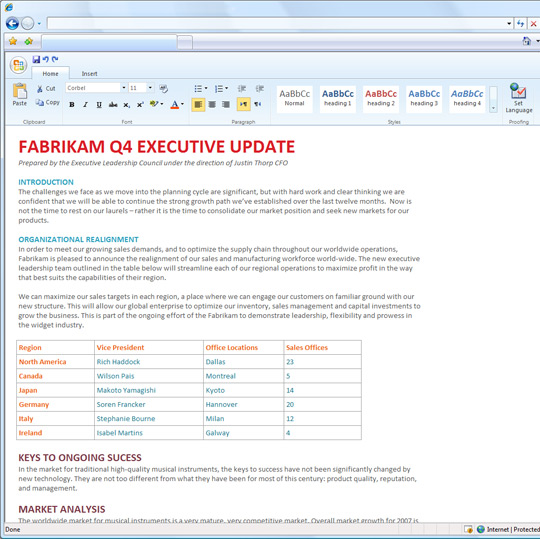
Office Web (Word) shown at the PDC 2008
Summary
As you can see, Silverlight 3 has the potential to spread throughout the Microsoft platform like a virus -- just like .NET started out with a wimper back in 2002 and now it's in every single API that Microsoft releases. I am willing to bet that Microsoft is already implementing a lot of these ideas and using the power of Silverlight as a web/cloud/mobile/desktop UI to enhance the funtionality and competitiveness of their products. Microsoft stands uniquely positioned to take advantage of Silverlight because of their deep platform of products. While Silverlight 1 and 2 were simply playing catchup to Flash/Flex, Silverlight 3 will be different. The upcoming spread of Silverlight version 3 and beyond across Microsoft products will become an important piece not only to the users but to developers as well who will be able to take advantage of the numerous features the framework will provide.
Note: In Part 4 of the series, I will take a look at what this means for Silverlight vs Flash/iPhone.
Silverlight 3 - What we Know So Far & What We Can Predict (Part 2 of 3)
Silverlight 3 Development Stack - Part 2
Part 1 - Silverlight 3 Announced Enhacements
Part 2 - Silverlight 3 Development Stack
Part 3 - Silverlight 3 Integration with the Microsoft OS and Platform Stack
Part 4 - Silverlight 3 vs Flash and the iPhone
Series Update: In Part 2 of the series, I decided to look at the Silverlight 3 Development stack and Part 3 will look at the Silverlight 3 platform/OS stack (I added another part in the series.)
In Part 1 of this short series, I looked at what we know so far about Silverlight 3 from what has been announced by Microsoft. In Part 2 of this series, I take some educated guesses as to what and how Silverlight 3 will be released in relation to the development environment. Note this article doesn't contain some random guesses. It is a higher level (architectural) overview of how Silverlight 3 could interact with the upcoming Microsoft development/technology stack. This article title also might be a little misleading when compared to Part 1 of the series as it tries to predict the development changes in Silverlight 3.
Silverlight 3 will obviously evolve as an individual technology and this next version will include a lot of changes that have not yet been made public. However, one of the huge differences between Silverlight and other RIAs is that Silverlight can benefit because of its ties to Microsoft's development, product and OS stack. This article looks at the Silverlight 3 development stack and its impact for the Silverlight developer.
Probable New Microsoft Development Stack from Silverlight 2 -> Silverlight 3
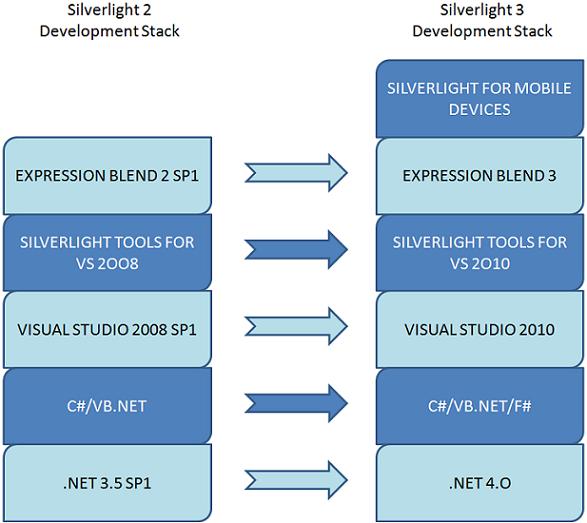
As you can see from the chart, MY GUESS (This is not confirmed yet) is that the entire Silverlight 2 -> 3 stack will evolve accordingly with all the Microsoft development technologies. I cannot stress how important that graph is above. Silverlight 3 will not only get its own features, but as a first class Microsoft technology, it will benefit from the core technologies that make Silverlight what it is.
No other RIA even comes close to providing these value add benefits that the Microsoft Development Stack does.
Predictions of each stack item and educated guesses on improvements for Silverlight (These are my educated guesses):
-
.NET 4.0
-
Prediction: Silverlight 3 will run on .NET 4.0 (The rest of these obviously snowball on each other. .NET -> Languages -> Visual Studio -> Tools).
-
Prediction: Silverlight 3 automatically will get an update (even though it's a subset of the full .NET framework) with all of the new changes happening to the BCL.
-
Prediction: The changes to WCF, WF, ASP.NET 4.0 should be able to be consumed by Silverlight either directly or through WCF services (more on WCF later).
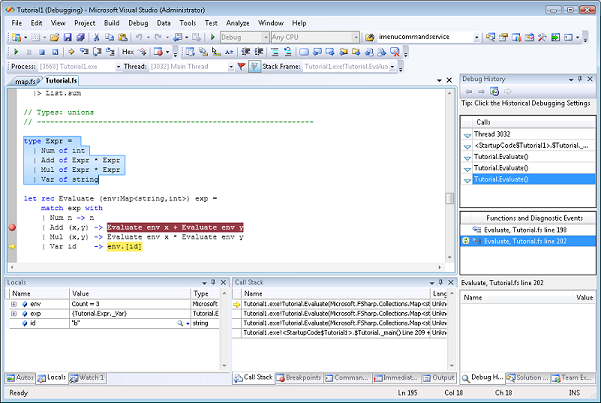
F# is now part of VS 2010 (Silverlight 3 as well?).
-
Languages
-
Prediction: C# 4.0 and VB.NET are evolving as languages and there are many new exiting changes happening with their syntax. Silverlight 3 should retain all those benefits as well.
-
In Silverlight 2 we got all the .NET 3.5 goodness: LINQ, LINQ to XML, lambda expressions, extension methods, automatic properties, implicit typed variables, etc. Going by that past trend, there is no reason why the new C# 4.0 features wouldn't naturally flow into Silverlight 3.
-
-
Prediction: F# for Silverlight will be HUGE. F#'s ability to create recursive/functional statistics will be an indispensable resource for the BLL on the Silverlight 3 client. With F# (math/functional background), we will have the ability to create very nice "lite" statistical/math/physics/game AI ON THE CLIENT rather than having to resort to services sending us the result.
- There are several "hacks" already to get Silverlight 2 working with the F# add-on, so I don't think this is pretty easily going to happen. Bill Reiss has a good article about how you can do this already.
-
For example, for Business Intelligence applications, creating more complex statistical algorithms will become much easier with F#. Imagine being able to offload this processing in parallel on the client and not having to rely on high latency services. Now we are talking real-time BI and delivering the insight visually with Silverlight animations, charts, graphs, etc.
-
Prediction: F# is going to be the Python/Dynamic Languages language of choice for non-MS developers moving to Silverlight 3 (he same way C# was that first class language for Java/C++ developers).
-
Prediction: F# is all about creating immutable types for concurrent programming. It is a nice paradigm shift that will make creating complex business processes ready for parallel processing easier than using non-functional languages. Especially for Business Intelligence applications, F# can be a game changer in how quickly you can design financial/statistcal algorithms and apply them to data sets on the client (in parallel).
-
If you are reading and nay-saying this, then you have no concept of statistcal based programming and how hard that is do in C#. Isn't Silverlight too slow to do this? Your Excel runs on the client and, with the same processes, is able to do very powerful Excel spreadsheets, right? How do you think Microsoft will implement some of the statistical functions on their Office Web - Excel? Hint Hint ;) There is absolutely no reason why Silverlight 3 won't be able to come close to Excel's performance.
-
Visual Studio 2010 & Silverlight 3
-
Prediction (obvious): Silverlight 3 will be part of VS 2010.
-
VS 2008 was released before Silverlight 2, so the Silverlight 2 SDK/Tools is an add-on for VS 2008. Hopefully, VS 2010 changes this and makes Silverlight projects/templates a first class citizen in VS 2010 (no add-on required).
-
Prediction (very obvious): VS 2010 will obviously evolve as a developer tool. Silverlight 3 benefits intrinsically through this evolution.
-
Prediction: VS 2010 & Silverlight have much closer ties with SDLCprocesses. The enhancements to Team Server, Unit Testing, Agile Processes, QA functional testing all should flow into the tool and Silverlight 3 should benefit from all of these changes.
-
Silverlight 2 of course has some of these frameworks. Unfortunately, they don't have native support in the VS Tools. I am hoping this changes in VS 2010.
-
Continuing the ball rolling....obviusly, it would make sense that the Silverlight 3 SDk/Tools are going to be made available for VS 2010.
-
Expression Blend 3 (Design 3?)
-
Prediction: Blend 3 becomes a FIRST class design client for Silverlight 3. I mentioned this already in
Part 1 of the series as an announced item. However, one thing I do want to stress is that my source of the information mentioned Microsoft's big investment in Blend. This should bode well for a monster release in Blend 3, making it a first class tool for Silverlight 3 designers and developers.
-
Prediction: Blend 3 integrates WPF, Silverlight and Surface XAML better including other tools like Illustrator. If Silverlight 3 includes new controls, XAML enhancements, better integration with WPF, it is pretty safe to assume that Blend 3 will work with VS 2010 projects natively. I am not sure that Microsoft would create features for Silverlight 2 backwards compatibility (other than importing/exporting Silverlight 2 assets).
-
Silverlight for Mobile Devices
- Prediction: Silverlight for Mobile Devices will be launched as part of Silverlight 3. In Part 1 of the series, I linked to a video from the PDC about Silverlight for mobile devices entitled: Microsoft Silverlight 2 for Mobile devices. In this video, you will note something interesting that it was being stated as Silverlight 2 would be the version for mobile devices.
- In my opinion, this will change in favor of Silverlight 3. As most of you know, the PDC took place at the end of October 2008 (right around the release of Silverlight 2 RTW). I don't think Microsoft wanted to "muddy the waters" with introducing Silverlight 3 as they were heavily pitching Silverlight 2 as the next big thing.
- We will probably have some emulator support for Silverlight 3 and VS 2010 and it will have its own set of guidelines.
- Prediction: Silverlight for Mobile Devices will be launched on Windows Mobile (duh), Symbian AND Blackberry OS.
- About the Blackberry OS: RIM is feeling the pressure from Apple's iPhone (I own one). Apple is stupidly locking down development (They just recently lifted the NDA) and won't let Flash on there (afraid of Flash becoming an EASIER programming platform??). RIM already includes Office Lite support (Excel, Word, Outlook, etc.) on their phones so they have a good relationship with MS. Silverlight on RIM based phones would be huge and further cement my belief that Silverlight is going to the leading business RIA.
- Prediction: Silverlight as a mobile programming runtime not just web glitz. If RIM opens up to a Silverlight runtime on their phone, they'll catch up to Apple real quick. That's what bothers me about some of these executives that make these grandiose promises with no clue as how the real world operates. Do I want to learn ANOTHER platform to program for the Blackberry? Why does RIM want to get into the app development business? Open your platform up to Silverlight. Let fit clients on there. The amount of applications will EXPLODE as you are now making your platform available to millions of .NET developers.
Relevant Dates - March 2009 & Q3 2009
March 2009: Around the Mixx 2009 conference, we should have a new Visual Studio 2010 CTP with Silverlight 3 compatibility and a go-live license (at least I hope). Q3 2009 should see the release of Silverlight 3. This would follow the same development timeframe Silverlight 2 took.
Summary
Hopefully in this article you learned about some of the possible changes that are coming to Silverlight 3 development. This no doubt will evolve Silverlight into a more mature platform that can take more advantage of advanced .NET framework features, enjoy further integration with ASP.NET/WCF/WF, leverage language enhacements (and new languages F#) and use the new Expression suite design tools.
Silverlight 3 - What we Know So Far & What We Can Predict (Part 1 of 2)
Silverlight 2 has been released a couple of months ago and just like any MS product, Microsoft has already been working on the next release :) Silverlight 3 is going to build on top of the Silverlight 2 runtime and add a lot of exciting enhancements. However, it also needs to improve on a lot of the existing shortfalls when compared to the current leading RIA technology (Flash/Flex). So what do we know is coming in Silverlight 3?
Announced Enhancements
- Silverlight for Mobile Devices
- Enhanced Business Application Development
- New dataSource control, new data controls (paging, data form, etc.), validation, back button support in browser, security/login, etc.
- H.264 Support
- 3D Support & Hardware Acceleration
- Visual Studio Design Time Enhacements
- Expression Blend 3.x for SL 3 & Enhacements
- Fit Client
- More Controls
Announced Enhancements
Silverlight for Mobile Devices
- What is it? Silverlight on the Mobile devices! What is really cool is that there will be no required changes to your existing SL code for it to work on the mobile device...really nice! So it has a one up on Flash where there is no "lite" version.
- Source of info: PDC 2008 - Microsoft Silverlight 2 for Mobile Devices
- Questions:
- What devices will be supported? Obviously, Windows Mobile will be supported. Symbian and Blackberry are probably other OS candidates that will include Silverlight mobile support. iPhone....if it's not getting Flash, no way is it going to get Silverlight :)
- Even though it is stated as Silverlight 2, I doubt that will remain. I think the version for mobile will match Silverlight 3 (This actually gives developers motivation to go to SL3) and this allows Microsoft to create tooling support/emulators. This would be harder for the existing Blend/Design/VS/Silerlight 2 Tools. What's more likely is this being added for Silverlight 3.
- There are some minor things like video brush that will not be available in Silverlight Mobile. However, the question is, what else "minor" will be missing?
Silverlight on a mobile device!

Enhanced Business Application Development
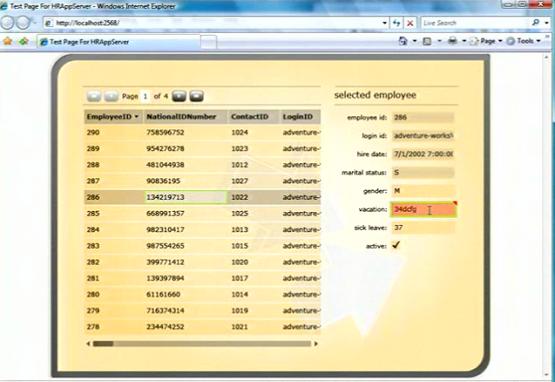
New data paging, data form, validation...
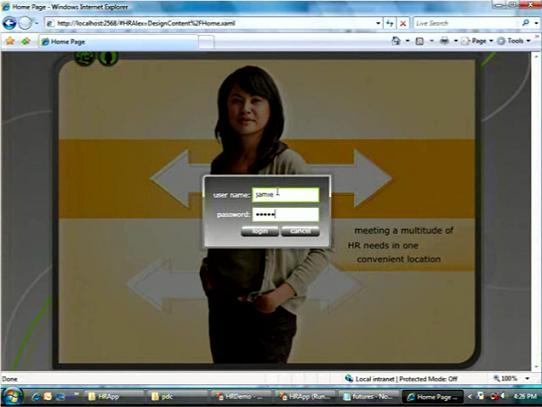
Forms Authentication with ASP.NET
- What is it? Silverlight 3 will include a business framework for creating rich LOB applications. This will make creating/maintaining LOB really easy (less plumbing and focusing on design)
- The framework includes:
- Data Source support for busines objects (ASP.NET)
- Paging for the data source
- Data Source events (on load data, etc.)
- Data form control
- Back button support for the browser
- Validation of business objects
- Custom validation on DAL automatically transferred to the UI stack (client side)
- Attribute based validation
- Security
- Forms authentication
- New authentication control
- Watch the video below for more demos.
- Source of info: PDC 2008 - Microsoft Silverlight Futures
H.264 Support
- What is it? It is an update to the MPEG encoder (MPEG-4) and it adds a lot of nice features and will probably be the standard way of encoding HD streams (http://en.wikipedia.org/wiki/H.264). Silverlight 3 will be able to play Flash HD videos as well.
- Source of info:
- Scott Guthrie's Blog
- ComputerWorld
3D Support and Hardware Acceleration

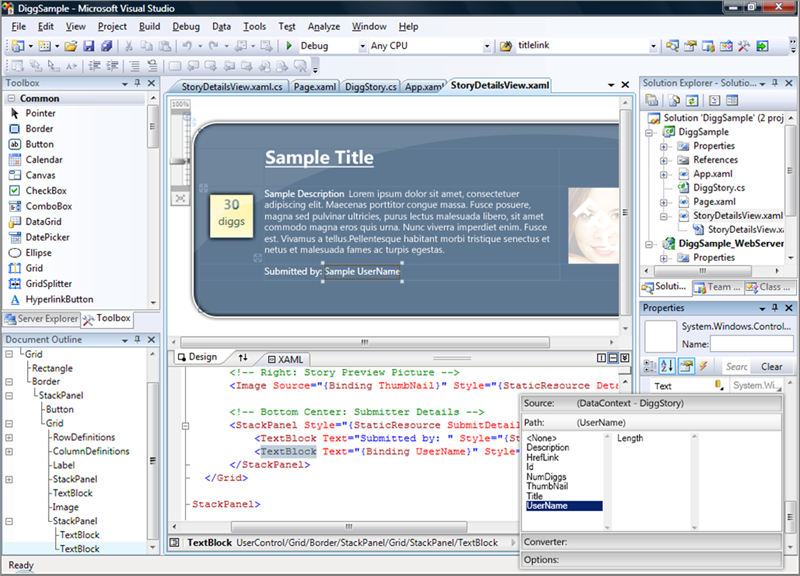
Visual Studio Design Time Enhacements
-
What is it? Visual Studio will actually aid in the design part of building Silverlight 2 applications. Visual Studio 2008 (granted, it was added before SL2 came out) has terrible design support and even the most basic changes require the designer/developer jumping to Blend 2 SP1.
-
Source of info: Scott Guthrie's Blog
-
Outstanding Questions: Which version of Visual Studio will it support? I have a suspicion it will most likely be Visual Studio 2010 and 2008 will not be changed for SL 3 (More on that on the bottom.)
Expression Blend 3.x for SL 3 & Enhacements
Fit Client
This article was authored 12/11/2008, as updates roll in before Silverlight 3 is launched I will update this page with further information. In part 2 of the series, I will look at some educated predictions for Silverlight 3 in addition to what has been announced.
WCF 101 - Understanding Transfer Security Visually
Overview
WCF includes a variety of security settings and design options. One of the security options the service architect has to worry about is transfer security. Transfer security deals with ensuring safe and secure communication between a client and service host.
Transfer security is very important for several reasons. Even the best authorization and authentication service design means nothing if the messages are not secure. Unsecure messages can lead to a variety of problems like:
-
exposing the message contents to the outside world including hackers
-
exposing other security mechanisms on how to compromise your service (authentication or authorization)
-
spoofed messages (By mimicking certain message patterns, hackers can create fake messages that can cause your service to end up corrupted.)
-
DOS attacks
WCF Transfer Security Implementation
WCF provides a variety of ways to secure the communication channel between the service and the client. Using these options properly can lead to highly secure communication with a very low probability of your messages being compromised. Conversely, even missing a small setting in the transfer security configuration can lead to messages that can have compromised privacy or integrity.
Generally speaking, WCF supports four different ways to secure your service transfer mechanism:
- Transport - This secures the messages by using a secure protocol that encrypts the entire channel that the messages are flowing over.
- Message - This secures the messages by encrypting the messages themselves.
- Both - This method combines both Transport and Message security. This secures the messages by encrypting the messages themselves and encrypting the channel.
- Mixed - This method uses Transport security to protect the message contents. However, message security is used to protect the credentials of the user.
A developer who is not experienced with WCF might have a hard time comprehending these concepts initially. Therefore, I decided to show at a very high level how you can understand these transfer security modes visually.
Unsecure (None) Transfer Security
Messages are unencrypted over a channel stack that is unsecure

- Messages are are unencrypted and the channel is unencrypted as well.
- Unsecure transfer security is obviously not recommended.
- Services DO NOT have to have content you want to protect in order to provide message security. Without properly protecting your messages, your service can be exposed to hackers and it could cause unwanted performance problems as well attacks like relay or DOS attacks can bring the entire service down.
Message Transfer Security
Messages are encyrpted over a channel stack that is unsecure

- Individual messages are encrypted.
- Message transfer adds the most overhead and latency to the WCF service (other than the Both/Mixed option)
- Each message needs to be properly encrypted and encoded as it leaves the client or service.
- Each message needs to verified that it was not tampered with when it is received.
Transport Transfer Security
Messages are unencyrpted over a channel stack that is secure (If the channel were unsecure, you could see the messages in clear text.)

- The messages are not encrypted; however, the channel is secure through using a secure protocol.
- The communication channel is set up intially and transport security can take advantage of hardware acceleration and thus, can be further optomized.
- Transport security is point to point. Since the messages themselves are not encrypted, once they go to another point, they can be potentially exposed to integrity/privacy attacks as if they were unsecure.
Message Transfer Security (mulitple hops)
Messages are encyrpted over an unsecure channel between the client and the service endpoint (1st hop). Notice the messages remain encrypted between the first service and second service (2nd hop).

-
The big advantage of message security is that it provides end to end security.
-
Message security is not provided by all bindings and it is considered the best practice when designing enterprise services organized in a "matrix".
Transport Transfer Security (multiple hops)
Messages are unencyrpted over an secure channel between the client and the service endpoint (1st hop). Notice the messages DO NOT remain encrypted between the first service and second service (2nd hop).

-
The big disadvantage of transport security is that it is only guaranteed to be point to point.
-
Message leaving and the intermediate service are not secure (by default).
-
Messages can be secured in the 2nd hop; however, it requires additional work.
Silverlight supports Transport level security natively out of the box with WCF configuration. Message security is possible inside Silverlight; however, it does require additional advanced programming beyond setting simple binding/behavior settings. However, message security is not 100% supported with all the different options like securing Messages with credentials.
Summary
In this article, I introduced the basics of WCF transfer security design scenarios. I decided to show the differences visually so that this concept is easier to understand for those new to WCF.
Silverlight enabled WCF Service Template is Bad Practice
Silverlight-enabled WCF Service Template
Visual Studio 2008 SP1 with the Silverlight Tools includes a new template that makes creating a WCF service that can be consumed with Silverlight very easy. Once you you have the Silverlight Tools installed, you can use the template when adding a new item:
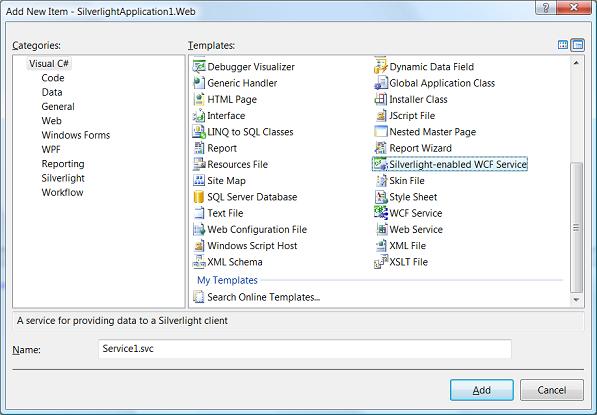
Adding a WCF service based on this template does several things for us:
- Like any other WCF Service template, this adds the refrences to all the necessary System.ServiceModel assemblies.
- It adds a WCF endpoint based on the BasicHttpBinding (which is one of the three Silverlight supports natively); Modifies the web.config with the endpoint information.
- Adds a class/contract baseline information to our service class.
- The service can be consumed by a Silverlight 2 client with no other necessary configuration (excluding deployment considerations).
Let's take a look at the code that was generated from the service template:
namespace SilverlightApplication1.Web
{
[ServiceContract(Namespace = "")]
[AspNetCompatibilityRequirements(RequirementsMode = AspNetCompatibilityRequirementsMode.Allowed)]
public class Service1
{
[OperationContract]
public void DoWork()
{
// Add your operation implementation here
return;
}
// Add more operations here and mark them with [OperationContract]
}
}
Above what we have is a public class called Service1 with one method DoWork(). The service is decorated with an attribute called ServiceContract (ServiceContractAttribute). This tells the client what operations can be called on the service. Applying the ServiceContract attribute on a class (or interface) exposes the type to service consumers. WCF works on an opt-in model and methods need to explicitly configured to be exposed in the service. This is what the OperationContract attribute (OperationContractAttribute) is for. You apply this attribute on any methods that you want the client to be able to call through the service. These two attributes are all that is needed to expose a service publicly.
The problem with the template implementation is that it places the attributes directly on the class itself. This obviously is a bad practice as it couples the service implementation and the class implementation together. If you have read any architecture books/resources, this paradigm is not new to you. Why is it bad for WCF? When designing a WCF service, a developer needs to prepare for future use of the service and be ready for possible changes. The more places you make changes causes the more items that could potentially break. This could cause QA to be involved in re-testing certain parts of the program. We obviously want to split this up so that the service design/contract (what types and what methods the service exposes) are seperated from actual implementation (what the DoWork() method does). Another reason we want to break the contract and implementation is so that the contracts can be re-used on the client. WCF includes a lot of gotchas especially when generating a proxy on the client. What actually happens when you generate a proxy is that these types and the service exposed methods actually are generated on the client class inside the proxy. You can mitigate lot of these issues by simply having the service contract types on the client. (I will cover this in another article; showing how to create an assembly that can be used both in Silverlight and .NET that shares service contracts).
Interfaces - The real Service Contracts
By defintion, an interface is a contract that a class implementing has to adhere to. Interfaces by definition fit the WCF structure very well here and we should define our service contracts (how the service will be designed) in our interface and then have our class implement this design. You can see we are essentially factoring out the structure of our services all in our interfaces and then creating the actual implementation in our classes (how the service is going to do these operations). In any WCF book you will read, it is stated over and over that the service/operation attributes should be placed on the interface rather than directly on the classes.
As you can see above, the template applied these service contracts directly on the class. This is obviously a bad practice in WCF design. Let's re-work the template above so we can create a service design that is factored outside of the implementation. First, we can create an interface with one method DoWork() and apply the proper attributes and it will look like this:
using System;
using System.Collections.Generic;
using System.Linq;
using System.Text;
using System.ServiceModel;
namespace SilverlightApplication1.Web
{
[ServiceContract(Namespace = "")]
interface IService1
{
[OperationContract]
void DoWork();
}
}
Now we can refactor our Service1 class and simply implement the interface. Notice I removed the ServiceContract and OperationContract attributes as they are now on the interface. (Note: The AspNetCompatibilityRequirements attribute can ONLY be applied on a class, and this attribute is really there for backwards compatibility with ASP.NET and in true WCF rarely will you see it used).
using System;
using System.Linq;
using System.Runtime.Serialization;
using System.ServiceModel;
using System.ServiceModel.Activation;
using System.Collections.Generic;
using System.Text;
namespace SilverlightApplication1.Web
{
[AspNetCompatibilityRequirements(RequirementsMode = AspNetCompatibilityRequirementsMode.Allowed)]
public class Service1 : IService1
{
public void DoWork()
{
// Add your operation implementation here
return;
}
// Add more operations here and mark them with [OperationContract]
}
}
If you had followed the steps above, the service would not work when accessed. The service will error and say that the contract could not be found.
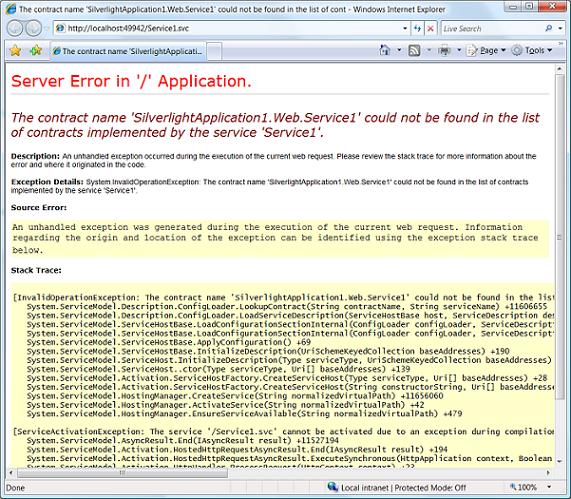
When the template generated the WCF configuration, the ServiceContractAttribute was applied to on the class directly. The service is looking for a type called Service1. WCF and the configuration is not smart enough to know that we have an interface called IService1 and that Service1 is a class that implements that contract. Therefore, we have to explicity give the name of the class or interface that has the ServiceContractAttribute applied to it. In our example, this is the IService1 interface. We simply need to change service configuration inside the web.config from this:
<service behaviorConfiguration="SilverlightApplication1.Web.Service1Behavior" name="SilverlightApplication1.Web.Service1">
<endpoint address="" binding="basicHttpBinding" contract="SilverlightApplication1.Web.Service1"/>
<endpoint address="mex" binding="mexHttpBinding" contract="IMetadataExchange"/>
</service>
to this:
<service behaviorConfiguration="SilverlightApplication1.Web.Service1Behavior" name="SilverlightApplication1.Web.Service1">
<endpoint address="" binding="basicHttpBinding" contract="SilverlightApplication1.Web.IService1"/>
<endpoint address="mex" binding="mexHttpBinding" contract="IMetadataExchange"/>
</service>
Summary
The Silverlight-enabled WCF Service Template is a nice way to get started with implementing a Silverlight-based service. However, because the contract definitions are directly applied to the class, it should not be used as guidance on how one should lay out their WCF design. As you saw above, it is quite easy to refactor the service design from the implementation in a couple of steps. This allows your WCF service to follow WCF best practice guidelines. The template is a good starting point for starting a Silverlight WCF project but only after refactoring the initial contract. In the next article I will show how to refactor the contracts into an assembly both the service and the client (service consumer) can share.