Silverlight 2.0 - Concepts To Become A Silverlight Master (Series Part 3 - Blend)
Series Articles:
In order to get a better understanding of how Silverlight applications are designed from a UI perspective, let's take quick look at the Silverlight architecture.
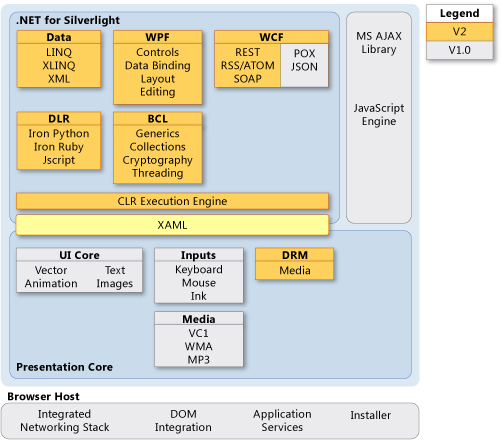
Notice under the WPF Heading listed are Controls, Data Binding, Layout & Editing. You might be wondering, why does this say WPF? The reason is Silverlight essentially leverages a subset of WPF technology (some parts are different) for the items mentioned. Before it was branded with the term Silverlight, it was actually known as WPF/E. Therefore, one can see that Silverlight has its roots in WPF. Furthermore, note how the WPF technology stack replaced the UI Core in Silverlight 1.0. WPF has been around since 2006, when .NET 3.0 was released. However, WPF adoption has been slowed because of poor UI tool support. In Visual Studio 2005, it was complete mess to try to write a WPF solution. Improved WPF support was finally added in VS 2008 (more is coming in .NET 3.5 sp1). However, Microsoft realized that in order to create rich/interactive applications, a first-class design tool was needed. This is how the Blend product came to be.
The Blend product is part of Microsoft's Expression Studio, which is a collection of first-class design tools. Microsoft Blend is a design tool that makes creating & editing XAML-based applications easy. Both WPF & Silverlight use XAML to declaratively control the controls, binding, styles, animations, etc., for the UI. Visual Studio is a great development IDE and has some basic design features. However, adding a full-blown designer inside the VS shell would have had poor results. Blend has been created with the designer in mind and the latest version(s) are actually written inside WPF! Expression Studio is a much needed application. Microsoft is competing primarily with Adobe AIR/Flex products. While Microsoft has the developer tools on its side (Visual Studio, C#, WCF, etc.), Adobe is the gold standard for graphical applications. Because Adobe products such as Flash, Illustrator, PhotoShop, etc., are tightly integrated and provide a designer first-class tools, Microsoft needed a strong design suite of their own.
Seperating Blend into its own product allows graphic designers to create/layout/style the application while the developer focuses on the code/data communication, etc. However, in order for this to happen, Microsoft had to leverage the ability of XAML to declaratively control layout, data binding, styling, templating, resource management, etc., inside Blend. Simply creating a second product and saying this is for designers and Visual Studio is for developers would not go over well! I think of it this way: Wherein some IT shops, DBAs are the only ones to touch the database and app developers only touch the the code. Except inside Blend, the seperation is the XAML/UI from the code behind. Hopefully, this makes sense as to why Microsoft decided to seperate the heavy design operations to another product.
By now you are probably asking yourself: So what can Blend do for me?
- Currently the Silverlight 2.0 SDK adds very little design support inside Visual Studio 2008. A developer can definitely lay out a simple application; however, harnessing the true power of Silverlight with animations/effects/styles/templating is not all there. As I mentioned above, I don't believe this will change in the RTM for the simple fact that it would be a real mess to try to add all the tools that Blend provides inside the VS shell.
- Silverlight 2.0 uses Blend 2.5 (This might change when the RTM version comes out) and this gives Silverlight 2.0 first-class design support for layouts, controls, animations, styling, templates and resource management. All these items that a developer would normally have to code by hand inside XAML are done for you simply using the Blend product.
- Blend has excellent integration with Visual Studio 2008. A developer can write a piece of code, jump to Blend, add a new control/user control and jump right back into Visual Studio and add some code behind. This is all done very seamlessly and the integration is fantastic. Blend can even build the entire Silverlight solution and perform test runs inside Blend as well! Even as of Beta 2, this integration is first class and I cannot stress the power of this feature enough.
- Blend is much more than just dragging and dropping a button and changing a color or a brush. The true power of Blend comes with the ability to spice up an application with animation/transitions/styles quickly giving a Silverlight applications that fluid/liquid interface that many compare to the iPhone for example. Blend does this by using a set of tools that expose XAML functionality (Remember, Blend just writes XAML). For example, creating a new button that looks completely different but behaves like a button is straightforward or attaching a set of transitions for mouse events is easy simple. These kind of additions not only make the UI look modern but can add visual queues, emphasis, enhanced spacial layout that were harder to do but add greater value to the application.
- Blend is not just for a designer. Not every IT department is going to have a dedicated designer able to strictly focus on pretty designs. I am not a designer. However, I dabbled with PhotoShop, GIMP, etc., and I could not do much beyond the tutorial I was using. Blend makes creating a first-class design clear once you have a good understanding of the capabilities of the product. The product definitely has the designer in mind; however, even a developer can use it and extend a Silverlight design.
- Creating advanced custom controls usually has been left to 3rd party libraries. Furthermore, creating professional looking controls demanded knowledge of GDI+ (which wasn't easy). Creating professional custom controls/user controls has never been easier with Blend. Personally, I have created simple mashup controls to pretty complex grid controls and it was actually pretty fun. In my opinion, Blend is really going to give some of the 3rd party controls a run for their money in Silverlight 2.0. The tools inside Blend drop the learning curve signifigantly for creating custom controls.
- Blend essentially gives you the tools to bring Silverlight applications to life and to design Silverlight applications using best practices for future enhancements, data binding, templates, etc.
From the list above, one can see that Expression Blend does a lot for you! This is why I feel it is a must, even for a developer, to learn Blend real well (unless you are the sadistic kind and like to crack open Notepad and hack XAML). Understanding Blend will allow a developer or a designer to bring their applications to life and harness the full power of Silverlight.
Silverlight and Multi Touch Tablets
If you follow gadget or tech sites, you probably have seen some buzz around Tablet PCs in the last couple of days. Yesterday Mike Arrington from TechCrunch posted a request to the community to help build a low-cost web tablet device with TechCrunch.
The goals of the project are simple:
-
low cost...about $200.00 (runs Linux)
-
Runs Firefox in kiosk/ATM mode. Basically, it by passes the OS and turns on directly into Firefox
-
i-Phone like input; touch screen
Just as the story I just mentioned was getting buzz, there were rumors posted on Gizmodo that there might be a MacBook Touch coming out in October. Obviously, these are just rumors so there are little details...but that story is real interesting as well as the timing of the story especially the day after the TechCrunch story got posted and got HUGE attention/buzz.
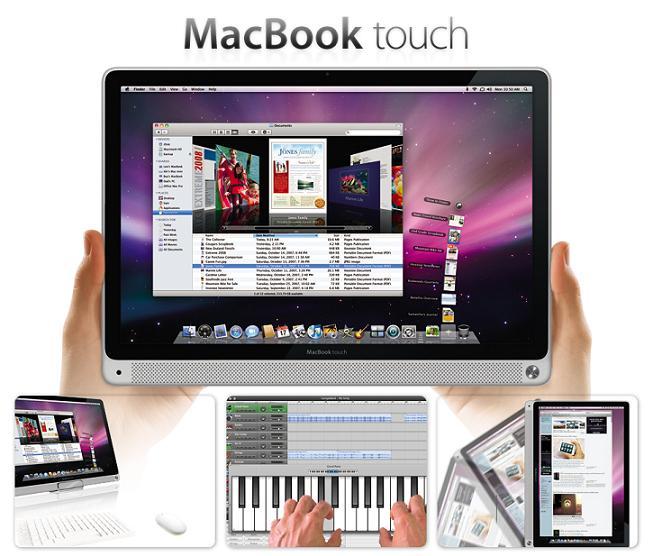
In the last couple of days we have a lot of buzz about two tablet products. Table PCs are nothing new; in fact, I used one back in 2003. Furthermore, Dell offers a Tablet PC as well. However, back in 2003 the multi-touch technology simply was not there (had to use a stupid stylus). The Tablet PCs were slow, handwriting recognition was poor and it loaded XP. Furthermore, the presentation technology was nonexistent. Basically, you were running an OS with a stylus on a big screen in a clunky machine. The new Dell product is basically a laptop that has a touch screen LCD panel that can rotate at a greater angle. Tablet technology up to this point has not succeeded in the mainstream. However, I think these two upcoming products can succeed. Think of it as Tablet 2.0 technology or even a Tablet relaunch :)
Apple has these things in their corner:
-
they are the gold standard in multi-touch & input technology
-
they proved they can master sleek, innovative, thin design
-
the current technology with longer battery life, solid state drives, improved graphics & presentation work
I think these sleek, thin web tablets are going to be the next hot thing in the next 6 months. How does this fit in with Silverlight? If you read the articles, you are probably asking yourself where you missed the Silverlight references. Both of these products obviously are not going to be formally supporting Silverlight in their plans. However, this is where as a .NET developer or company you can get a piece of the pie. Silverlight is supported on a MAC/Safari. So once the MacBook Touch launches, Silverlight will just work. The TechCrunch Tablet is a little harder because it runs on Linux. Hopefully the Moonlight project can get going again and give better support for Linux or maybe Microsoft will shock us and release a Linux plug-in. However, since the TechCrunch web tablet was just announced yesterday, I would be shocked if anything was ready in the next 6-8 months. October with the MacBook Touch (if the rumors are true) will be around the corner much faster.
Applications on the iPhone have a fluid user experience. What do I mean by that? The user has little interaction with the keyboard. It is all about scrolling, sliding, flipping, dragging while keeping things SIMPLE. Effective applications for these tablets lacking a keyboard will have to do just that and mimic the user experience from the iPhone or Microsoft Surface. Silverlight will allow you to do just that. By designing applications in Silverlight, it will allow you to bring the user experience to life. Silverlight allows you to present the layout of your application spatially and through animations/effects you can bring real time interactivity to the user. Do you think a user of an iPhone who is used to the iPhone interface would want to load an application from 2 years ago that is a step back? Of course not. This is where Silverlight compiled code rocks because it is ultra responsive and nothing out on the web can compete with it.
Silverlight is a web technology and it is distributed through a plug-in. This is a perfect way for Silverlight applications to sneak onto the tablets and get some of the attention of the user base. This is why I am such a big advocate of Silverlight technology; because of how well it can complement the user experience in this example and others. You know users will demand high quality and responsive interfaces (the iPhone generation is spoiled) and Silverlight is one way to spoil them even more. Silverlight: learn it, use it and abuse it. Hopefully, this article gave everyone a glimpse into the future on why it is a good idea to invest time in learning Silverlight. It would be even better if the article gave you some ideas of applications/tools to write for the upcoming web tablets!
Silverlight 2.0 - Concepts To Become A Silverlight Master (Series Part 2 - WCF)
Series update: I changed the name of the series as the name was slightly confusing.
Series Articles:
Silverlight 2.0 technology is based on a web plug-in that runs on the client's computer. Writing applications/tools/games that don't depend on data is straightforward and doesn't require the Silverlight developer to think much beyond the client's domain. However, what if the developer wants to introduce external data into their Silverlight 2.0 application?
First, the bad news:
- Silverlight 2.0 currently runs on a small subset of the .NET 3.5 Framework. This means some of the "direct" data channels/communication libraries are not available to you (i.e., remoting, COM, database, etc.)
- Silverlight hosts its app domain on the client's workstation. This means that even though it is a web technology hosted on a web server, it can't leverage resources on the web server that do not cross the web server domain (i.e., database calls, local dll files that call a database, local dll files that consume a service)
- Another limitation is that because Silverlight utilizes a minimal/secure plug-in architecture, you cannot access local workstation data channels easily. For example, a fat client windows application can call a database, windows/web services, make remote calls, etc. Most of these (as you guessed it) are not available to you.
So HOW can I consume some data from an external data source? Silverlight 2.0 Beta 2 currently supports these communication channels:
As you can see from the list above, Silverlight 2.0 (as of Beta 2) supports a variety of communication mechanisms. Most of these, excluding Sockets/JavaScript-bridge, focus on service technology. Therefore, as a developer, you can talk to the data store inside your service application and expose it via any types of these services. Consuming these services can be done several ways, but that is not the focus of this article. Designing these services can be done several ways as well.
As a developer, what is the best way to design services that a Silverlight plug-in client can consume? Luckily, this is where WCF comes in (Finally, the meat of the article).
WCF is an acronym for the Windows Communication Foundation, which was introduced in .NET 3.0. WCF (like LINQ/.NET) is one of these technologies that is hard to summarize in one good definition. Some developers simply say WCF is web services or a way to design SOA. My definition of WCF is actually not mine. This definition is from Juwal Lowy's forward from his great book Programming WCF Services:
"WCF is a fundamental technology that provides an easy and clean way to generate services and applications in compliance with what I regard as sound design principles."
WCF (without going into too much detail) allows you to architect applications by applying best practice guidelines automatically. Security, throttling, opt-in serialization, logging, etc., are handled for you just by creating a service inside the WCF framework and setting config/attribute values. Juwal Lowy (in web casts/book/classes) says you can spend time writing plumbing code and trying to adhere to best practices or use WCF and allow it to do the majority of the work for you.
Silverlight runs on a subset of the .NET 3.5 framework, so it does not support all of the WCF bindings and can't consume every type of WCF binding/endpoint. However, from the list above utilizing WCF (as your service engine) you can design: SOAP 1.1 Services, Duplex Services, AJAX Enabled Services & REST Services. All of these can be consumed by the Silverlight 2.0 client.
A great aspect of WCF is that it allows you to write your application and expose it using various binding endpoints supported by Silverlight. Furthermore, existing WCF services can simply be "Silverlight enabled" by providing a compatible Silverlight endpoint. Depending on the functional requirement, of course, this might not be possible.
The diagram below demonstrates the same services being consumed by different clients using different endpoints:
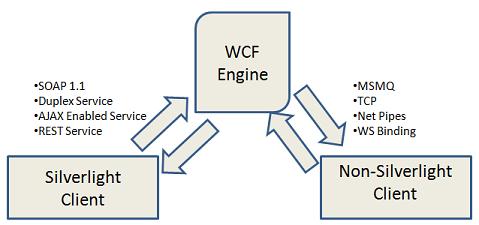
Quickly doing a search on services+Silverlight, you will notice that WCF comes up a majority of the time. Microsoft is pushing WCF heavily as a best practice for writing services for Silverlight. In fact, after installing the Silverlight 2.0 SDK, you have a new template called "Silverlight-enabled WCFService" for quickly creating WCF services that can be consumed with Silverlight.
Silverlight 2.0 Beta 2.0 allows the developer to configure the WCF service inside a ClientConfig file. This is a real nice add for additional configuration of WCF services, especially if you are a software vendor that needs to change connections/tweak settings for different deployments declaratively.
WCF (in .NET 3.5) has great support for creating RESTful services. RESTful services are used all over the place: Flickr, MySpace, Amazon, etc. WCF allows you to quickly create low/high REST services that can use XML, JSON or RSS encoding. Silverlight can consume these easily. In fact, many examples online show this by communicating with external REST services and manipulating the data on the client (i.e., using LINQ).
Summary of benefits using WCF to consume data in Silverlight:
- All the different Silverlight service types can be designed with the single WCF technology. Basically, anything you can do with other service design you can do with WCF. However, with WCF you are doing it with a single technology
- Allows the developer to design services focusing less on implementing best practices and plumbing code (WCF's biggest selling point, since it does a lot for you out of the box)
- WCF endpoint abstraction allows the developer to create service endpoints for both Silverlight and non-Silverlight consumers (while sharing the same code)
- Microsoft recommended best practice. WCF includes first class support in Silverlight: online examples, Silverlight-enabled WCF service template and clientConfig XML configuration file
- Best practice for the future. As Microsoft adds additional support to the Silverlight service stack, developers can be assured that probability-wise this will be done via WCF. For example, Duplex services (introduced in Beta 2)
In summary, Silverlight and WCF technologies complement each other very well. WCF is a single technology that provides you a single design mechanism to create a variety of solutions for exposing your data to a Silverlight client. WCF is not a requirement in order to consume data inside Silverlight (lots of examples online with 3rd party REST services). However, because of how well it works with Silverlight and deprecates other SOA design (at least in the MS world), it is a no-brainer that WCF is recommended by Microsoft. In my opinion, WCF is a technology every developer needs to master in order to be effective with consuming data inside Silverlight.
Silverlight 2.0 - Concepts to become a master series (Part 1 - .NET/C#)
Intro Silverlight is THE next generation rich web technology to learn if you are a programmer focusing on delivering web content. There are many articles out there on how to get started or how to write your first Silverlight program. However, many of these articles fail to address the specific knowledge you need to master to be a truly effective Silverlight programmer.
Silverlight, just like any technology, has a concrete matrix of concepts a programmer should focus on in order to be able to call himself a master of the technology. Fifteen to twenty years ago (before the web, before mobile technology, before networks were prevalant, etc.), you could have an almost complete grasp of software engineering by focusing just on a few skills. As software engineering started to mature and the web blew the door off the amount of new technology/processes/patterns available, it became impossible to be an expert in every single facet of software development. Silverlight is just a small thing right now in the bag of technologies available for developers to learn. However, the Silverlight technology demands that you are productive with certain concepts in order to become an effective developer with the technology. Learning a new technology like Silverlight can be a daunting task with the limited R&D time developers are afforded. Furthermore, not knowing which technologies Silverlight relies on to deliver complete solutions can definitely pose a challenge in trying to learn on your own blindly.
I have been working with Silverlight since Alpha 1.1 -> Beta 2 (on and off; mostly on since Beta 1) and there are certain subject matters that demanded my deep understanding in order to use them effectively in Silverlight. Instead of creating a massive post, I decided to create a series of posts about the core concepts a Silverlight developer needs to focus on. The goal of the article is to help developers getting started with Silverlight 2.0 understand what technologies they should get familiar with or which technologies to brush up on in order to learn Silverlight in the most efficient way.
Series Articles:
.NET 3.5/C#
Silverlight 2.0 is a Microsoft technology platform. Like all new Microsoft platforms, in order to develop on it, you have to know .NET. That's a given. Silverlight 2.0 runs on a subset of the .NET 3.5 framework which has a very small footprint. However, the Silverlight team managed to add a great deal of libraries (even lots of .NET 3.5 items) inside this sub system. Obviously, I don't think this comes as a shock to anyone that in order to program in Silverlight 2, you will be developing on .NET. Since you will be coding in .NET, it also makes sense that you will be coding inside Microsoft's flagship IDE Visual Studio. Visual Studio 2008 has great integration with Silverlight 2.0 with debugging/design/projects, etc. This is one of Microsoft's strong points. Architects/Sr. Developers debate platforms/languages (dynamic/functional/OOP), etc. all the time. However, what is not debatable is the fact that Microsoft Visual Studio is one of the best programming environments out there. Visual Studio/.NET are pretty much a requirement...no shockers here.
What is controversial is my opinion that your .NET language of choice should clearly be C#. Silverlight 2 is currently in Beta 2 release. For the most part, I find that the early adopters of any new technology are usually advanced developers. Like it or not, that trend usually applies to C# development over VB.NET. Let's take some examples:
-
If you right now want to find an article about Silverlight and a code example, the chances are 85%+ that this example will be exclusively in C#. Does that mean VB.NET developers can't learn Silverlight? No, I am simply saying that you have a MUCH easier time as a C# developer if you are reading examples in your native/favorite language.
-
The absolute best resource when learning a beta technology is blogs. Bar none. The Silverlight 2 books are just starting to come out in "beta" and Microsoft's own libraries are just starting to be populated and are not a great resource yet. However, blogs are great for beta technology as they allow you to overcome bugs/issues/undocumented concepts, etc. that plague beta releases. Most advanced bloggers blog in C#. This ties into my previous assertion that more advanced programmers prefer C#. Furthermore, C# has many shortcuts that allow bloggers to post clear/concise code while getting the point across. This is yet another advantage C# bloggers use when posting about Silverlight. Check out some samples on Jesse Liberty's blog,
Tim Heuer's blog , etc.
-
Magazine articles are your next best friends. They are dominated by C# syntax as well. I subscribe to ASP.NET and Code magazine (I used to get MSDN Mag when I had a MSDN Sub) and a majority of the code is in C#. Note: The only time I have seen a real master coder write in VB.NET almost exclusively was
Dino Esposito. I do think though after he went to idesign, Juwal Lowy straightened him out, as he has now been posting in C# :)
-
Microsoft documentation is 50/50 C# and VB.NET. Obviously, this case is a draw.
I am not saying that you cannot learn Silverlight without C#; just that I have found that it makes my life a lot easier. Imagine you are a VB.NET developer working on an issue and you are ready to throw something and you try to enter your problem into Google. The search engine pops up with a solution and then you see the delegate word being thrown around (anon methods) or the => symbol. Obviously you will have to decipher the syntax first before proceeding. Furthermore, I think as you become more senior with the C# advanced syntax, it actually becomes HARDER to read VB.NET. I completely disagree with MS's position that it doesn't matter. As the RTM approaches, this might change as more books appear (this tends to still favor C#, but less percentage-wise).
If you are just getting started in .NET by being drawn to Silverlight, I think you will have a much easier time learning Silverlight if you learn C#. Doing so will give you access to many more current samples/projects online in a native language.
Evolution of C# delegate syntax from .NET 1.x to 3.5
Delegates were introduced with C# 1.0 (with .NET 1.0) as a way to represent function pointers. Delegates like most other aspects of advanced C#/.NET programming were often misunderstood and a lot of times programmers didn't even know they were using them inside their code! One source of this problem was a rather cluggy syntax provided with the original C# 1.0 syntax. Luckily as .NET evolved, so did the syntax for delegates by becoming more concise and clear. This is exactly what this article focuses on; this is NOT an intro into delegates, how they relate/work with events or a "best practice" guide.
The best way to show delegate syntax in action is to try to solve a simple coding problem with them. Suppose I get asked this on an interview: I have a form with 2 text boxes and I can input 2 numbers. What I would like to do is when I click the "=" button (equals) is have the numbers be added via a delegate binary operation, by adding the two numbers.
So the form looks something like this:
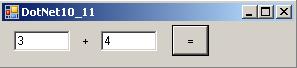
Let's assume that we have an event handler already hooked up to the button and after we click that button we expect the two numbers to be added.
.NET 1.x (1.0 - 1.1) Solution (C# 1.0)
This solution has four parts:
- Declare the delegate with the desired signature
- Declare a method that matches the delegate signature
- Instantiate the delegate (tell the delegate with method to call)
- Call the delegate and retrieve the result
Delcare the delegate:
delegate int Add(int firstNumber, int secondNumber);
The delegate type is created by using the delegate keyword (much the same way we would declare a string type; i.e., string someString = "test";) The second word is the return type for our delegate. Since we are trying to add two numbers we expect to get a integer (int) back. Next, is the name of the delegate. In our case, we named the delegate Add (much the same way you would name a method). Lastly, we need want our code to add two numbers together. Therefore, we would like to have two interger parameters that are going to be passed from our text box.
In the code above, what we did was create a template in a sense of how we want our method to look like. We do not know what this method will do yet, but we do know it will have two integers as parameters and it will return an integer.
Declare a method that matches the delegate signature:
private int AddNumbers(int firstNumber, int secondNumber)
{
return firstNumber + secondNumber;
}
Here we declared a method that matches the desired signature of our delegate type. Our method is called AddNumbers and it takes two integer parameters and has a integer return. The method is where our simple business logic of adding two numbers will occur and the method body will execute and give the delegate some kind of functionality (in our case add two numbers).
Instantiate the delegate (tell the delegate with method to call)
Add add = new Add(this.AddNumbers);
This piece of code will instantiate a new Add type and tell it to call the AddNumbers method. Behind the scenes, the compiler compiles the delegate type we declared (code in "Declare the delegate") into a class. This class can take a parameter for its constructor a method that matches the signature of the delegate. It doesn't matter what the method is called or what the underlying business logic does. The only thing that matters is that the signature of the method matches the signature of the delegate. To reiterate (in our case) this is a method that has 2 integer parameters with an integer return type.
Call the delegate and retrieve the result
int result = add(Convert.ToInt32(this.txtFirst.Text), Convert.ToInt32(this.txtSecond.Text));
Calling the delegate is the simplest part. Now that we have an instance of the delegate called "add", we simply pass in the two integer parameters. Above, we have two text boxes and we convert each Text property into an integer and pass them into the instance of our Add delegate "add". The delegate takes these parameters and simply calls the method it was told to in the step above and passes these paramters.
For those confused, you can just call the delegate directly. For example:
As you will see below, all of the different types of using delegate code use the same way to call the delegate. This part of calling the delegate does not change, no matter what method you use!
Summary
Using delegates in .NET 1.0 - 1.1 (2002 - 2003) was not the friendliest. There were a few steps to go through. Many programmers taking the leap from VB.NET or another language simply by passed delegates because of the additional syntax. Imagine learning a new language and trying to conceptualize using delegates and their uses. Delegates in these early days of .NET were usually used/abused by C++ programmers familiar with the delegate C++ counterpart. Delegates also in those days had some performance issues; design implications (making a public delegate is bad) and some designs could cause memory problems.
Putting it all together would look something like this:
1 // 1) Declare a delegate
2 delegate int Add(int firstNumber, int secondNumber);
3
4 // 2) Declare a method (matches the delegate signature)
5 private int AddNumbers(int firstNumber, int secondNumber)
6 {
7 return firstNumber + secondNumber;
8 }
9
10 private void btnAdd_Click(object sender, EventArgs e)
11 {
12 // 3) Initialize the delegate to a method that matches the signature
13 Add add = new Add(this.AddNumbers);
14
15 // 4) retrieve the result
16 int result = add(Convert.ToInt32(this.txtFirst.Text), Convert.ToInt32(this.txtSecond.Text));
Not counting comments/whitespace it was about 7 lines of code to declare/initialize/call a delegate back in the .NET 1.x days. More importantly, you have 4 seperate parts to this solution.
.NET 2.0 - 3.0 Solution (C# 2.0)
.NET 2.0 introduced a concept called anonymous methods. This allowed us to call inline business logic (i.e., a method) without having to have the method defined. The business logic simply became part of the delegate. Let's see how this improved our delegate syntax for our scenario.
This solution has three parts:
- Declare the delegate with the desired signature
- Instantiate the delegate (with the business logic defined inside the delegate "body")
- Call the delegate and retrieve the result
Delcare the delegate:
delegate int Add(int firstNumber, int secondNumber);
The delegate type declaration is the same as the prior version.
Instantiate the delegate (with the business logic defined inside the delegate "body")
Add add = delegate(int firstNumber, int secondNumber)
{
return firstNumber + secondNumber;
};
We put the business logic now inside the "body" of the instantiation of the delegate. Notice how we skipped the method decleration in this solution, because it's not needed since it's inside the delegate "body".
So, this is nice and clear and we eliminated a whole part (no more method to declare) and one statement of code. This is what anonymous methods allow us to do, by putting the method logic directly inside the "body" of the delegate. The syntax for the anonymous method starts with the word delegate itself after the equal sign. In this case, it tells the compiler that we are declaring an anonymous method. The next step is to define the parameters to match the signature of our Add method, which are the two intergers respectively. Our inline body of our delegate is the same as our AddNumbers method returning an integer. That's all there is to it. Anonymous methods can have no parameters and as well can have no (void) returns.
Call the delegate and retrieve the result
int result = add(Convert.ToInt32(this.txtFirst.Text), Convert.ToInt32(this.txtSecond.Text));
Same as before. Nothing new to see here.
Summary
Using delegates in .NET 2.0 - 3.0 became simpler. Not just because you eliminated one line of code, but because now it had one less "working part" and programmers not familiar with delegate syntax could easily tell what was going on. This solution obviously would not work when you wanted to design more complex/re-usable objects. However, it made the use of anonymous methods in predicates and simple situations much easier and the delegate syntax was finally resembling some brevity that functional languages enjoy.
In summary, our .NET 2.0 - 3.0 solution looks like this:
1 // 1) Declare a delegate
2 delegate int Add(int firstNumber, int secondNumber);
3
4 // 2) Initialize the delegate using an anonymous method(new in .NET 2.0)
5 Add add = delegate(int firstNumber, int secondNumber)
6 {
7 return firstNumber + secondNumber;
8 };
9
10 private void btnAdd_Click(object sender, EventArgs e)
11 {
12 // 3) Retrieve the result
13 int result = add(Convert.ToInt32(this.txtFirst.Text), Convert.ToInt32(this.txtSecond.Text));
A lot more concise and we elminated 3 lines of code; 1 part (method decleration) and the code is a little clearer to read.
.NET 3.5 Solution (Type 1) (C# 3.0)
.NET 3.5 (C# 3.0) introduces even more brevity to delegate syntax with lambda expressions. Lambda expressions are a further evolution of syntax brevity for anonymous methods. You take the spirit of declaring the business logic inline with delegates even further. I broke the .NET 3.5 solution into type 1 and type 2. Type 1 uses just uses the new lambda expression syntax.
This solution has several parts:
- Declare the delegate with the desired signature
- Instantiate the delegate (with the business logic defined inside the delegate "body")
- Call the delegate and retrieve the result
Delcare the delegate:
delegate int Add(int firstNumber, int secondNumber);
The delegate type declaration is the same as the prior version(s).
Instantiate the delegate (with the business logic defined inside the delegate "body")
Add add = (firstNumber, secondNumber) => firstNumber + secondNumber;
Whoa! That looks different. Let's take a step back and see how we got to the lambda expression from the anonymous method.
In the .NET 2.0 version we had something like this:
Add add = delegate(int firstNumber, int secondNumber)
{
return firstNumber + secondNumber;
};
First, let's remove the delegate keyword. Since the delegate keyword back in the .NET 2.0 (C# 2) version told the compiler we were declaring an anonymous method, it needs to be replaced since we want to use lamdba expressions. Since we are going to replace the anonymous method syntax with lambda expression syntax, we need to use the keyword that tells the compiler we are working a lambda expression. This keyword is "=>". The compiler would like to see this after the parameters are defined but before the inline body of the expression.
Our first step in our lambda expression will look like this (This is valid syntax and will compile):
Add add = (int firstNumber, int secondNumber) =>
{
return firstNumber + secondNumber;
};
The expression now reads: The parameters of integer firstNumber and integer secondNumber "goes to" return the sum of firstNumber plus secondNumber. The code above is now a fully functioning Lamdba Expression and not an anonymous method anymore. Replacing the "delegate" keyword with the appropriate location for the "=>" keyword converted this from an anonymous method to a lambda expression. This is very important, so the compiler with this simple keyword swap now knows we are dealing with a lambda expression.
We didn't really gain much here. We essentially replaced one keyword with another. What we can do next is add additional lambda expression shortcuts. Lambda expressions do not require curly braces or return type.
If we remove both of these, this expression now becomes:
Add add = (int firstNumber, int secondNumber) => firstNumber + secondNumber;
That's getting much better. Notice, no curly braces or the return keyword; the C# 3.0 compiler can derive all this information for us! The expression looks more concise now. But we can do better. The compiler is even smarter now since it can detect the type of parameters we want to use. We don't need to explicitly say that we are passing in two integers; this is detected by the compiler.
Now the full expression (after removing the two int keywords) remains as just the parameter names:
Add add = (firstNumber, secondNumber) => firstNumber + secondNumber;
Call the delegate and retrieve the result
int result = add(Convert.ToInt32(this.txtFirst.Text), Convert.ToInt32(this.txtSecond.Text));
Same as before. Nothing new to see here.
Summary
We did a lot here. Lambda expressions make a big difference in syntax brevity and clarity. Let's take look what we have now:
1 // 1) Declare a delegate
2 delegate int Add(int firstNumber, int secondNumber);
3
4 // 2) Initialize the delegate using a lambda expressions (new in .NET 3.5)
5 Add add = (firstNumber, secondNumber) => firstNumber + secondNumber;
6
7 private void btnAdd_Click(object sender, EventArgs e)
8 {
9 // 3) Retrieve the result
10 int result = add(Convert.ToInt32(this.txtFirst.Text), Convert.ToInt32(this.txtSecond.Text));
A lot more concise and we elminated 3 more lines of code! Now we are getting somewhere.
.NET 3.5 Solution (Type 2) (C# 3.0)
The type 2 solutions still utilizes lamdba expressions. However, it also uses the new Func delegate. A Func is a delegate type with several generic parameters defined. There are 5 different Func delegates pre-defined for you with .NET 3.5. Why are there 5 different ones? This should cover you for most of your scenarios when designing methods/delegates, etc. Usually if you are creating signatures of methods with more than 4 parameters, you probably need to refactor your parameters into an object. '
For example, the Func that we need has to have 2 input parameters and a return parameter. This one that is pre-defined in .NET will suit us great:
public delegate TResult Func<T1, T2, TResult>(T1 arg1, T2 arg2);
This solution has ONLY TWO parts:
- Declare & instantiate the delegate (with the business logic defined inside the delegate "body")
- Call the delegate and retrieve the result
Declare & instantiate the delegate (with the business logic defined inside the delegate "body")
We already have a delegate (Func) with the required signature we need. It is a generic delegate; however, we can determine the types of parameters/result we need. All we need to do is create a variable of this type and pass in the expression we created above (.NET 3.5 Type 1). Our entire decleration/instatiation is in ONE line of code now:
Func<int, int, int> add = (firstNumber, secondNumber) => firstNumber + secondNumber;
Now that's nice concise syntax!. All we did was declare a variable called add of type Func with 2 integer parameters and an integer return parameter (return type). On the right-hand side of the equation we simply just use the lamdba expression from the example above.
Call the delegate and retrieve the result
int result = add(Convert.ToInt32(this.txtFirst.Text), Convert.ToInt32(this.txtSecond.Text));
Same as before. Nothing new to see here.
Summary
This is as simple as you are going to get right now; a single line of code to declare/initialize a delegate with a lambda expression.
1 Func<int, int, int> add = (firstNumber, secondNumber) => firstNumber + secondNumber;
2
3 private void btnAdd_Click(object sender, EventArgs e)
4 {
5 // 2) Retrieve the result
6 int result = add(Convert.ToInt32(this.txtFirst.Text), Convert.ToInt32(this.txtSecond.Text));
This is as concise as you will get. One line of code to rule them all :)
If you want to delve deeper, I would suggest picking up a C# 3 book. I didn't really explain some of the origins of this code and some of the nuances with anonymous methods/lambda expressions or even delegates. I just wanted to focus on the evolution of the C# syntax. Attached is a simple VS 2008 solution zip that demonstrates the 4 different major -- there are lot more smaller permutations -- ways to write delegate syntax. I broke the solution so that each type of code is in its own respective form (this way, every variable is named the same). I also did not want to introduce any other C# constructs but wanted to strictly focus on the topic which was the syntax.
EvolutionOfDelegates.zip (55.06 kb)
Welcome to SilverlightHack
This will be my authoratative blog primarily focusing on Silverlight, Business Intelligence, WCF, SQL Server and all the other good stuff I currently play with. I have a back log of about 20-25 articles that I have written and notes that I think would be valuable to start sharing with the .net community. I will start posting good articles [somewhat soon].