Silverlight MultiThreading with a Computational Process (Counting Primes)
Intro
In my previous post about multithreading I looked at the importance of using multithreaded techniques to improve the performance of the UI controls. This post focuses on using multiple threads to improve computational performance inside Silverlight.
I saw this article by Tim Anderson comparing Silverlight and Flash in a computational situation by counting primes. I also saw derivatives of this article comparing the performance of Silverlight vs JavaScript/TraceMonkey. Silverlight is a clear winner in both articles. However, we can do better. This article will focus on how we can improve the performance of Tim's code by adding multithreaded processing inside Silverlight. I am not focusing on math theory, the counting prime algorithm or hacks to make other versions better. This article focuses on some straightforward Silverlight 2 multithreading optimizations.
Demo and Beta 2 Source Code are provided.
Update 10/14/2008..The demo is now on Silverlight 2 RTM and the Silverlight 2 Source Code is up.
Overview of the example & demo:
First, check out Tim Anderson's example and run the example on your machine to see what we are going to be optimizing. Also, note the performance of the runtime on your workstation. Run it a couple of times each to get a good baseline. Silverlight should be faster by a factor of 4.
So let's improve the code with more threads (remember, not the algorithm; I want to keep it the same). I created a small application that has the standard implementation (standard code); an example with two threads and an example with three threads. Click on the example below to launch it.

-
The first button is essentially Tom's code and performs the code in single thread
-
The second button spins up 2 threads using the BackgroundWorker to calculate the primes (using the same code in the first button)
-
The third button spins up 3 threads using the BackgroundWorker to calculate the primes (using the same code in the first button)
-
The last input UI control is a textbox that allows you to enter an integer (1 to whatever) to add a factor of 1,000,000 to end with. For example, 2 will calculate the primes for 2,000,000 integers; 3 will calculate for 3,000,000 integers. This way we can increase the number of integers we want to calculate by simply changing the integer in the text box (There is a specific reason why I implemented the prime counter to use this method as I cheat a little bit in the implementation. More on that below)
Overview of the multithreaded implementation:
My implementation of how the multiple threads calculate a single process (i.e., counting the primes from 1 -> 1,000,000) is very similar to the logic that is implemented by the Microsoft Parallel Extensions. Check out the video on Channel 9 where Joe Duffy and Igor Ostrofsky explain how some of the parallel extensions work. I would recommend watching the entire video; however, you can ffwd to about the 8 minute mark to get a decent understanding of the logic I am mimicking. Below is a screen shot of the logic that the parallel LINQ uses when dealing with some kind of process on a data structure like an array:
Let's overview the logic that Parallel LINQ uses (It does MUCH more than this, but we are doing something simple at a high level):
-
We have an input array of 5 numbers.
-
In the logic above we are spinning up 2 threads.
-
The first thread will do some kind of processing on the integers: 3, 1, 2
-
The second thread will do some kind of processing on the integers: 5, 6
-
Each thread will store each product in an intermediate data structure
-
After both threads are completed, then the output from the two intermediate structures is combined and returned to the main thread.
This is exactly the same logic I am using for counting primes in a multithreaded environment.
- We have a number of integers we want to count primes to (i.e., 1,000,000)
- Say we want to use three threads to calculate primes from 1 -> 1,000,000
- The first thread will handle the numbers between 1 -> 333,332
- The second thread will handle the numbers between 333,333 -> 666,666
- The third thread will handle the numbers between 666,667 -> 1,000,000
- As each thread finishes, it adds to the count of the integers that are primes.
- When all three threads finish, the final result is reported back to the main UI thread.
Overview of the key lines of code:
In my previous writeup, I used the BackgroundWorker to implement the processing on multiple threads for this demo. In this example, I do everything manually and you could write logic to dynamically spin up the necessary threads as needed using delegates. Like I mentioned, this code mimicks the high level logic in the parallel extensions library. In the future, I hope that they release a parallel extensions dll for Silverlight which will do exactly what we are simulating in this example/demo.
The code below handles the calculating of primes for three threads:
private void CalculatePrimesOptimizedThreeThreads_Click(object sender, RoutedEventArgs e)
{
    // Reset the variables.
    this.threadsReportingThree = 0;
    this.multiThreadedPrimesThree = 0;
    this.multiThreadedStartThree = DateTime.Now;
    /*
    You do not want to do this in production code.
    I would do something like this once the delegates support async thread invocation.
    Func callCalcAsync = this.calculateNumberOfPrimes;
    callCalcAsync.BeginInvoke(1, 500000, [add callback method], null);
    */
    this.bw31.RunWorkerAsync();
    this.bw32.RunWorkerAsync();
    this.bw33.RunWorkerAsync();
}
The code in the event handler above simply resets the timespan & count variables. Finally, it spins up the three seperate threads in order to process 1/3rd of the counting of the 1,000,000 primes.
void bw31_DoWork(object sender, DoWorkEventArgs e)
{
    e.Result = this.calculateNumberOfPrimes(1, 333332*this.multiplyFactor);
}
void bw32_DoWork(object sender, DoWorkEventArgs e)
{
    e.Result = this.calculateNumberOfPrimes(333332 * this.multiplyFactor + 1, 666666 * this.multiplyFactor);
}
void bw33_DoWork(object sender, DoWorkEventArgs e)
{
    e.Result = this.calculateNumberOfPrimes(666666 * this.multiplyFactor + 1, 1000000 * this.multiplyFactor);
}
The code above shows the processing of each of the three threads do after they are initiated by the RunWorkerAsync() method (in the first code snippet). Each of the threads calls the calculateNumberOfPrimes method with the respective procesing range passed in. Simple stuff.
void bw3_RunWorkerCompleted(object sender, RunWorkerCompletedEventArgs e)
{
    // Poor way to do a waithandle. Don't do this in production code.
    // Use the waithandle...that's what it's there for.  I am keeping this simple.
    // until Silverlight 2 gets full async support
    object lockObject = new object();
    lock (lockObject)
    {
        this.threadsReportingThree++;
        this.multiThreadedPrimesThree += (int)e.Result;
        // Don't do anything until both threads have reported.
        if (this.threadsReportingThree == 3)
        {
            DateTime end = DateTime.Now;
            Double timetaken = end.Ticks - this.multiThreadedStartThree.Ticks;
            timetaken = timetaken / 10000000;
            this.lblCalculatePrimesOptimizedThreeThreads.Text = "Number of primes up to: " + 1000000 * this.multiplyFactor + " is " + this.multiThreadedPrimesThree.ToString() + ", counted in " + timetaken + " secs.";
        }
    }
}
In the code above, we are performing the last step of our parallel extensions simulation. We are synchornizing the result of the three background threads. As each thread finishes, we add to the number of primes that each thread process has found. When all three threads finish, we report the result the the UI (main thread). Note, we do perform a lock on the processing code as we could appear in a race condition with two threads finishing at the same time. The probability of this is small; however, not thinking about these things usually results in intermittent code and causes weird bugs to occur. Furthermore, the more threads to sync, the higher the probability of errors like this occuring.
Performance Gain Tests
Before we start looking at the demo numbers, we need to understand that this processing doesn't come free. Spinning up extra threads from the threadpool, figuring out which section of work each thread should process, storing the results in intermediate structures and finally synchronizing the threads all have an associated processing cost with them. Obviously, in production you could adjust the multithreaded logic based on your data/environment(s), make it configurable or make it dynamic and figure out which is the best way to process. Longer running processes done on client machines with multiple cores will benefit from this multithreaded implementation than those that don't meet this criteria.
Performance Gain Tests - Test Core 2 Due 2.2 GigHz
The first test machine is a Core 2 Duo 2.2 GigHz. The workstation has two physical cores, so it can handle multiple processes better than a single core processor. Depending on your workstation specs, you may receive different results. This is a typical standard desktop/laptop you could buy from Dell/HP in the last 1.5-2 years.
Test 1 (counting the number of primes from 1 -> 1,000,000). Factor is the default: 1
-
Single thread time: .362 seconds
-
Two threads time: .256 seconds
-
Three threads time: .257 seconds
Notice right off that multithreading the computation already netted a nice performance gain of over 40%! Notice there isn't much of a difference between two threads and three threads. Remember, when I mentioned above that there is a cost associated with each thread you use in splitting up processing on each core. Obviously, the cost here is roughly equal to the benefit. Therefore, they wash each other out and three threads process in about the same total time as two threads. One way to mitigate the cost of multiple threads on a core is to increase the amount of available cores :)
Test 2 (counting the number of primes from 1 -> 5,000,000). Factor is the default: 5 (dramatically increases the processing time). I ran these tests multiple times and picked the lowest run I received (You will receive different results as you may have different items running in the background on your workstation).
-
Single thread time: 3.194 seconds
-
Two threads time: 2.031 seconds
-
Three threads time: 1.719 seconds
In this example, we can see that the difference between the single threaded and dual threaded implementation is about 1.1 seconds! That is a huge difference. Let's look at the three thread implementation. It actually came in 0.3 seconds lower than the two thread implementation. So now we are seeing some benefits of our third implementation. It is not very drastic; however, as we increase the processing needed, the difference gap will increase further in the time span. The percentage different should remain roughly the same.
Performance Gain Tests - Dual Processor Quad-Core HaperTown 5420 (Intel Xeon 2.5 GigHz)
The second test machine is a server: Quad-Core 2.5 GigHz. The server has 8 physical cores. This test is just to show what results we come up with when the cores are increased by 4x.
Test 1 (counting the number of primes from 1 -> 1,000,000). Factor is the default: 1
-
Single thread time: .234 seconds
-
Two threads time: .15625 seconds
-
Three threads time: .1093 seconds
With a higher class of processor, these times are a lot faster than the previous results. However, with 2 extra cores now our three thread implementation is already 42% faster than the two thread implementation. Note that during our test on a dual core, the three thread implementaton was indentical to the two thread implementation.
Test 2 (counting the number of primes from 1 -> 5,000,000). Factor is the default: 5 (dramatically increases the processing time). I ran these tests multiple times and picked the lowest run I received (You will receive different results as you may have different items running in the background on your workstation).
-
Single thread time: 2.25 seconds
-
Two threads time: 1.401 seconds
-
Three threads time: 0.997 seconds
The times are obviously faster and the margins are about equal between the last test (The three thread implementation is about 40%+ faster than two thread implementation). The performance of the three threads is 125% faster than a single threaded computation!
What's happening during the tests?
If you have a dual-core or a quad-core workstation, you can try this yourself by simply opening up task manager (while testing different implementations). I set the factor to 15 to count the number of primes from 1 -> 15,000,000. This will simulate a longer running process that hopefully registers properly on the task manager.
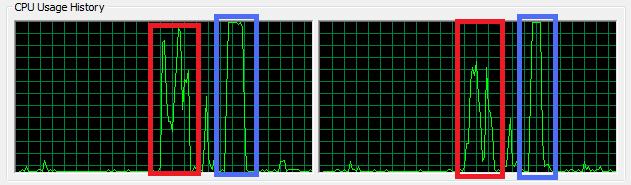
Above is a screen shot of the task manager CPU usage of both cores while performing the prime calculation for 15,000,000 integers. The data in the red box was captured for the single threaded implementation. The data in the blue box was captured for the multithreaded implementation (2 threads). Notice from the graph that the duration for the single threaded implementation is longer than the multithreaded implementation. Furthermore, during that duration the single threaded implementation does not take full advantage of both cores. The CPU does some switching automatically for the process; however, it's not perfect. Contrast this with the multithreaded implementation which spikes both cores to 100% and keeps it at 100% until the processing has finished. The graph in the blue is the kind of graph you want to see from a fully multithreaded process.
Who cares? Why would I want to do this in a web app?
In the world of Web 1.0 and maybe even Web 2.0 days, you probably would want to leave heavy processing to a server or move to a fat client application. With the start of cloud computing, Web 3.0 or "Web OSes" more is expected from web sites inside the browser. Multithreading isn't just about AJAX and calling a web service anymore. Inside Silverlight, you can do some real powerful optimizations by leveraging multiple threads. This can be useful in a lot of areas. Just to name a few:
- Silverlight game programming (i.e., AI)
- Applications that handle a lot of data
- Simple math/physics simulations
- Server monitoring of processes, databases, etc.
If you are professional programmer reading this, I hope I don't have to convince you to utilize multithreaded patterns in your code to net 40% performance gains! :) Just take a look at the net gain on a server machine with three threads...125%! This is with my simple/manual/hacky waithandle logic, so there is definitely more improvement to be netted here.
My last two articles gave detailed examples of multithreading, which were an intro to my next post in my Silverlight Master Series.
Beta 2 Source code: SilverlightPrimes.zip (544.08 kb)
Silverlight 2 RTM code: SilverlightPrimes_RTM.zip (543.73 kb)
Sliverlight Multithreading with Controls (Slider example)
In the next couple of entries in my Silverlight Series, I am going to talk about multithreading, LINQ, etc., and how they can be used inside Silverlight to create rich applications. However, I thought it might be a good idea to give a simple and well-explained example of before delving too much into why multithreading in Silverlight is important (vice versa). In this article, I want to briefly introduce multithreading inside Silverlight and the show how one can improve UI performance by introducing secondary threads into the events from UI controls.
Demo and Source Code are provided.
Update 10/14/2008..The demo is now on Silverlight 2 RTM and the Silverlight 2 Source Code is up.
Introduction
Silverlight runs as a plug-in inside the browser. Some people describe it as "Flash" or a virtual desktop. The virtual desktop is a good analogy to desktop (fat client) programming. Those familiar with writing desktop applications know if you have long-running method calls (i.e., scanning the hard drive), making a database call or a web service call, that is done on the main UI thread by default. Experienced developers know that making these calls on the main thread can cause the UI to become unresponsive or completely give the appearance of a blank UI window. Creating a responsive UI usually entailed the desktop developer delving into mulithreading the background calls and keeping the main thread primarily to be used for UI operations. Silverlight UI development shares these UI characteristics of desktop development.
The Silverlight team at Microsoft wants Silverlight to shine and perform "out of the box" by making the multithreaded choice for you.
- If you have done any kind of Silverlight service call, you already have a mental note that Silverlight already does a lot work for you on secondary threads. Calling a WCF service or an ADO.NET Data Service is done on a secondary thread with all the events properly dispatching to the main thread. This is a plus that developers not too familiar with .NET & multithreading can create responsive (in terms of UI) applications because they have no other choice :)
- Silverlight takes this further and certain objects like the StoryBoard or Timers are also done on seperate threads. This allows the developer/designer to create animations without having to worry about multithreading for performance as it is done for you.
- When you first hit a website that has Silverlight content, it will be brought down while a progress inidicator (whether it is the default or a custom implementation) shows how far along a user is in downloading content. While the last example is not a true example of multithreading inside Silverlight, it does amplify the fact that Silverlight has a lot of multithreaded content "out of the box" and nudges the UI developer towards that way.
Not everything inside Silverlight multthreading is "out of the box" and a professional Silverlight developer has to understand that adding expensive calls based on UI controlled events will cause the Silverlight application to beome unresponsive. Luckily Silverlight 2 includes a rich subset of the .NET 3.5 (SP1) stack and there are many options for developers dealing with multithreaded design.
Example & Demo with the Slider control
The Slider is a real basic control inside Silverlight. You have seen the Slider implementated anywhere as a volume control or even as a query tool (i.e., Amazon diamond search). A slider is designed to have a smooth user experience. The user should be able to quickly move the slider thumb into position and clearly know what value they are on.
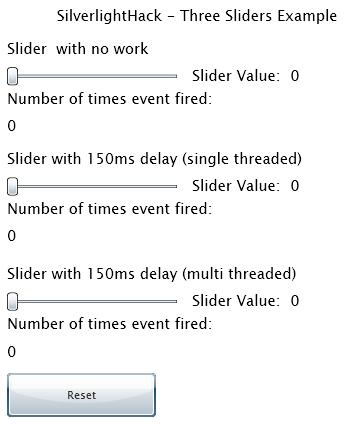
What if the movement of the slider thumb is associated with an expensive calculation, web service call or long LINQ query? The demonstration below shows us three different sliders:
-
The first slider is a simple slider that performs a very quick output to the UI with how many times the move event was fired and the current value of the slider thumb.
-
Notice how many events are fired for just a simple "slide movement".
-
Just a simple movement from beginning to end can cause event handler to be called 30+ times (This depends on how slow you move the slider).
-
The second slider simulates a heavy operation. It includes a 150ms operation inside the event handler method.
-
Notice the "sliding" movement operation is now seriously degraded.
-
The granularity of the slider is also impaired. Because of the delay, it is harder to move the slider to the exact position we want.
-
Fast slider movement causes "big jumps" in the slider.
- The third slider includes the EXACT same 150ms delay simulation. The big difference is that the "heavy work" is done on a seperate thread and not on the main thread.
- Notice the performance compared to the second slider.
- The granularity and thumb movement is a lot better. The user would not even notice that there is a significant process being done behind the scenes.
Code Overview
The source code is commented and self-explanatory for the most part. I do want to go over the multithreaded implementation in Silverlight. Silverlight 2 Beta 2 currently does not support asynchronous delegates. There are a few ways to write multithreaded processes. The best way in Beta is probably utilizing the BackgroundWorker class. Those familiar with desktop programming will be familiar with the implementation. The BackgroundWorker automatically controls the secondary thread and properly threads dispatching through events/delegates. It makes adding expensive processes on secondary threads trivial.
Let's go over some key parts of the code:
We declare the BackgroundWorker as a field, so it is properly scoped and can be used throughout the code file. Furthermore, we want to wire up two events to their methods. RunWorkerCompleted event fires after the work on the secondary thread has completed. We can use this to get a result from the work or simply notify the UI that the process has finished. The DoWork is the actual process that will be executed on the secondary thread. This method will simulate the heavy work.
// declare background worker
BackgroundWorker bw = new BackgroundWorker();
public Page()
{
	InitializeComponent();
	// wire up background worker events
	this.bw.RunWorkerCompleted += new RunWorkerCompletedEventHandler(bw_RunWorkerCompleted);
	this.bw.DoWork += new DoWorkEventHandler(bw_DoWork);
}
Now that we have the our BackGroundWorker defined and wired up to fire methods, we need to declare these two methods:
- The bw_DoWork method is pretty simple and just puts the current thread to sleep for 150 milliseconds. Note that when you are in this thread, you are executing on the background thread not the main thread. So this will put the secondary thread to sleep, not the main UI thread. Furthermore, you cannot access any UI objects. This will throw a cross-reference exception.
- The bw_RunWorkerCompleted method is called after the 150 millisecond delay is complete. This method is called on the main UI thread so it is safe to access UI objects. What happens in this method is simple; Since I am done processing whatever my slider move caused, I simply notify the UI what the current value is.
- Note the code calls itself again if the user moved the slider while the code was in the middle of processing on the second thread.
void bw_DoWork(object sender, DoWorkEventArgs e)
{
    // add a fake delay of 150 milliseconds (3/20 of a second)
    System.Threading.Thread.Sleep(150);
}
void bw_RunWorkerCompleted(object sender, RunWorkerCompletedEventArgs e)
{
    // Set the slider value to its text box
    // Notice this is set here, as it guarantees that the value is now officially set
    // Setting it in the SliderMultiThreaded_ValueChanged event, the 2nd thread would have to catch up to the UI
    this.txtSliderMultiThreadedValue.Text = this.SliderMultiThreaded.Value.ToString();
    // Run the background worker again in case the Slider value needs to catch up
    // If you stop the slider at the end, for example, it might be still processing the previous event
    // You want to make sure that where the slider is stopped (last event fired) matches what was processed by the 2nd thread
    if (!this.bw.IsBusy)
    {
        // If the values are not in sync, then the 2nd thread needs to catch up to the UI
        if ((this.SliderMultiThreaded.Value != this.LastMultiThreadedSliderValue) && (this.LastMultiThreadedSliderValue != 0.0))
        {
            // Run the process again, if the last value set has not been run by the second thread
            this.bw.RunWorkerAsync();
            // set the value to 0.0
            this.LastMultiThreadedSliderValue = 0.0;
        }
    }
}
Kicking off the asynchronous process is simply done by calling the RunAsync() method on the BackgroundWorker variable (bw in our example) in the SliderMultiThreaded_ValueChanged event. This method is non-blocking on the UI thread and if you debug it, it will look like it finishes instantly. It actually spins up a secondary thread and performs the logic inside the bw_DoWork() method we defined above. Notice below that the code only fires the asynchronous process if the BackGroundWorker is not busy. This is key, as this will throw an exception if we try to kick off another process on the BackGroundWorker if it is not done. This is why we have to do the "catch up" step above because the secondary thread could be busy processing the work while the user triggers another slider change event by moving the slider thumb.
private void SliderMultiThreaded_ValueChanged(object sender, RoutedPropertyChangedEventArgs e)
{
    // increment multi threaded slider event count
    this.countSliderMultiThreaded++;
    // Set the last value set compared to the current value
    this.LastMultiThreadedSliderValue = this.SliderMultiThreaded.Value;
    // Execute the work on a second thread
    if (!bw.IsBusy)
    {
        bw.RunWorkerAsync();
    }
    // Set the count on the text box
    this.txtSliderMultiThreadNumberEventFires.Text = this.countSliderMultiThreaded.ToString();
}
Compare to other RIA Technologies (Flex, Java)
How does this compare to Flash/Flex? As of now even with Silverlight's limited multithreading support (Dispatcher, StoryBoards, BackgroundWorker, Services/Sockets, etc.), it actually is a lot better than Flash/Flex. Flash/Flex DO NOT have multithreading support (at least as I understand it). There is some multithreading in Flash 10 (which is also in beta). I do not use Flash/Flex, from what I understand the new multithreading capabilites are more behind the scenes and do not include a first class multithreading and thread synchronization environment. I was pretty suprised when I found that out and I see that is a huge problem for Flash/Flex.
Many people who disagreed with me in my previous post when I listed the advantages of Silverlight over Flash at least agreed .NET favored Silverlight. .NET is too much of a broad statement to simply state a simple advantage because of the MANY subpoints that .NET brings to Silverlight. Simply saying .NET as an advantage is a big understatement. First class multithreading support is a huge win for Silverlight vs Flex/Flash. Why does this matter? Because any computer made in the last couple of years probably has a dual processor or more inside it. It is all about adding cores not adding processing speed. Silverlight takes advantage of this and it's only in beta! You could write a similar slider application inside Flash/Flex with some tricks (using a resource govenor to manage the thread like context switching), but why would you want to??!! Silverlight is already way ahead in the multithreading game compared to Adobe's RIA product.
JavaFX does have multithreading support for certain keywords used as triggers. I wouldn't call it the same thing that Silverlight 2 RTM will offer. However, JavaFX and Java can be used together and Java does offer full multithreading support. Silverlight is nice in that it offers first class support all in one spot in one language.
Conclusion & Future
With this demo, I tried to drive home the point that in order to create the best UI experience for Silverlight users, ensure that you leverage all of the features inside the .NET Framework. In my opinion, this is what makes Silverlight shine compared to other RIA technologies. Silverlight 2.0 Beta 2 includes several options to add multithreading capabilities to your RIA applications. Once delegates are added and are able to invoke methods asynchronously, this logic can become a lot more clearer and lot more functional looking (.NET 3.5 -> lambda expressions, etc.).
In the RTM release I see Silverlight supporting full delegates with dynamic invoking and my hope is that PLINQ/Parallel Library will come to Silverlight as well. If those two things happen, Silverlight will be the clear leader for multithreaded RIAs and allow you to write very performant applications.
Silverlight 2 Beta 2 Code: Silverlighthack_SlidersMultiThreadedExample.zip (545.41 kb)
Silverlight 2 RTM Code: Silverlighthack_SlidersMultiThreadedExample_RTM.zip (547.45 kb)
Silverlight advantages over Flash (not another Silverlight vs Flash)
As I have been working with Silverlight over the last year, I came across many Silverlight vs Flash articles. Many of them are outdated and from last year (2007). Even entries from a couple of months ago (before Beta 1 or Beta 2) are essentially irrelevant.
I decided to write a (biased, obviously) post with some of the advantages Silverlight 2 Beta 2 currently has over Flash/Flex. Adobe Flash is much more mature of a product and has been around for over a decade now. A lot of the technology Macromedia/Adobe pioneered has simply been "copied/leveraged" by Microsoft. Even though this is the case, I am strictly going to focus on the aspects that make Silverlight 2 better than Flash.
-
Development IDE
-
The development IDE for Silverlight 2 is Visual Studio 2008. Bar none, Microsoft has the best development IDE on the market. Whether you are programming are a C++, C or Java programmer, you will learn to envy Visual Studio 2008. A lot of the items that I will post below can have constructive arguments. However, this is one of the few that is iron clad. There simply is NO comparison between Visual Studio 2008 and Adobe Flex Builder 3.
-
.NET Framework & Languages (C#, VB.NET and dynamic languages)
-
Silverlight 2 runs on a subset of the .NET 3.5 Framework. Therefore, it requires a the use of a .NET based language. The two flagship languages in .NET are C# and VB.NET. Flex uses ActionScript. If you are a .NET/Microsoft development department, you already have the majority of the skills necessary to start developing in Silverlight! That is a huge advantage over Adobe's counterpart. Silverlight also supports writing applications in dynamic languages such as Iron Ruby.
-
Intergration with Enterprise based technologies
- Perception as an RIA business framework
- Perception is everything. When I speak to other developers about Silverlight, they are generally very excited and motivated to learn the technology. Why? It essentially is very similar to Flash, which has been around for several years now. It is all about perception. For example, lets look at the iPhone when it launched last year (2007). Everyone and their mother lined up to get one, even though the phone was lacking major mobile technology that had been around for a couple years prior. Another example is VB.NET vs C#. VB.NET has always been looked as the red headed step child in .NET when compared to C#. C# has the perception of a more mature, professional and advanced language. This is where I think Silverlight has a huge perception/marketing edge. For creating business applications you will probably find it a lot more developers, architects and dev managers rallying around and more comfortable with Silverlight rather than Flex.
- Microsoft has Windows
- Like it or not, Microsoft still controls 85%+ of the desktop market. That percentage is even greater on business workstations. Even though Flash/Flex has a huge market lead now, Microsoft can simply put a monsterous dent in it by releasing Silverlight 2 RTM as a hotfix, part of a Service Pack or part of the next Windows release. Microsoft can simply distribute the Silverlight 2 RIA framework on a level no other company can. Many IT engineers will like Silverlight since it is a Microsoft based technology. It will make it a lot easier to distribute to their employees.
- Mesh
- Mesh right now is Microsoft's offering to sync up data between computers. It uses Silverlight as the UI. Unless you have been sleeping under a rock, you probably have heard Microsoft tried to buy Yahoo multiple times and tried to essentially buy their way into the search/advertising market. This is one area where since 1995 both Web 1.0 and Web 2.0 have both passed Microsoft by. Mesh is going to be Microsoft's big splash into Web 3.0 and the semantic web/cloud computing and allow them to compete with Google, Yahoo, FaceBook. What is great is that Silverlight is the UI for this huge "Internet 2" technology. If Mesh takes off (like a lot of people thing it will), Silverlight is going to be THE technology to know.
That's it? Notice I stayed away from topics like performance, XAML, codecs and all that. You will see many articles pointing one way and some in favor of the competing technology. I just wanted to list the main items that I think give Silverlight a clear edge over Flash/Flex. Not all of these items are current advantages. For example, items like Mesh have the potential to carry Silverlight as a first-class web technology. If you have any other key items to add, please comment below.
Update: I found this comment (from my comment section below) too funny. I wanted to post it up here. It's from James Cadd. I know it's not serious, but it just talks to the point I was trying to make about perception of Flash above: "I've been developing .NET business apps for 8 years now (since beta 1) and have found Silverlight very accessible. Keep in mind I do have WPF experience. But when I want to write some code in SL, not only do I know exactly what classes to look for, but I also bring with me the patterns I've used to develop with that specific set of classes for a long time now. The Flash people, of course, bring plenty of experience making animated images of monkeys swinging on trees ;)"
Silverlight 2 Tools, SQL Server 2008 and Visual Studio 2008 SP1 Installed & Working Together
This article goes over the steps needed to:
- Install SQL Server 2008, Visual Studio 2008 SP1 and Silverlight 2 Beta 2 together
- Install Visual Studio 2008 SP1 & Silverlight 2 Beta 2 together
- Items to remove if you had: SQL Server 2008 Beta/RC or Visual Studio 2008 SP1 Beta installed
Last week Microsoft released SQL Server 2008. SQL Server 2008 includes several tools and services that require .NET 3.5 Service Pack 1. The redistributable is included with the SQL Server 2008 installation. However, this caused problems with workstations that had Visual Studio 2008 installed. Visual Studio 2008 could not work with .NET 3.5 SP1 as it ran on the original .NET 3.5 version. This was the first thing I ran into when I installed SQL Server 2008 last week. This is all detailed in the Microsoft Help & Support section here:
http://support.microsoft.com/kb/956139
The second issue is that even if Visual Studio worked, the Silverlight tools for .NET 3.1 SP1 were not released. So I ended up uninstalling SQL Server 2008 and putting off my upgrade on all my workstations/servers. Today (8/11/2008) Microsoft released several tools in order for developers to install Silverlight, SQL Server 2008 and Visual Studio 2008 SP1 on a single workstation.
Before we get started, this is what you will need in order to compete the installation. Please note these items, as upgrading your workstation to this environment can take some time:
-
Depending on your workstation (processor/network connection), this can take well more than a couple of hours to set up.
-
Plan for 2-5 hours of non-continous time (you click install and browse the internet while it installs)
-
The more beta items you have installed the more complex the process will be
-
SQL Server 2008 has a new installation process. It helps to familiarize yourself with it before going any further
-
Visual Studio 2008 installed or CD (possibly need the CD media, more on that later)
-
Downlad the Visual Studio Patch Removal Tool (ISO file)
-
Download the Visual Studio 2008 Service Pack 1
-
Download the Silverlight 2 Beta 2 Tools for VS 2008 SP1
-
SQL Server 2008 (Download from MSDN, if you have a subscription) (ISO file)
-
Extract the ISO files:
-
Below are three scenarios listed. These should be done in the order noted below; Otherwise, you could run into problems. Specifically, SQL Server 2008 HAS to be installed after Visual Studio 2008 and Visual Studio 2008 SP1 (exception noted below):
On a 100% clean workstation, follow these steps:
- Install Visual Studio 2008
- Install Visual Studio 2008 Service Pack 1
- After the installation, it will prompt you for a reboot. If you are planning to install the Silverlight Tools, ignore the reboot and Install the Silverlight Tools. If not installing the Silverlight Tools, reboot the workstation
- Install Silverlight 2 Beta 2 Tools for VS 2008 SP1
- Reboot (If you do not reboot, you will receive weird errors that say the SP1 or Silverlight Tools are not installed)
- Install SQL Server 2008
On a workstation that has Visual Studio 2008 and NEVER had Silverlight Tools installed, SQL Server 2008 Beta/RC, .NET 3.5 SP1 Beta, follow these steps:
- Install Visual Studio 2008 Service Pack 1
- After the installation, it will prompt you for a reboot. If you are planning to install the Silverlight Tools, ignore the reboot and Install the Silverlight Tools. If not installing the Silverlight Tools, reboot the workstation
- Install Silverlight 2 Beta 2 Tools for VS 2008 SP1
- Reboot (If you do not reboot, you will receive weird errors that say the SP1 or Silverlight Tools are not installed)
- Install SQL Server 2008
On a workstation that has Visual Studio 2008 and you installed any of these items: SQL Server 2008 Beta/RC, VS 2008 SP 1 Beta or Silverlight Beta 2 Tools for VS 2008
- Uninstall SQL Server 2008 Beta/RC0 (if applicable)
- This includes all the components (.NET 3.5 Beta 1, SQL Server 2008 Browser, Support Files, etc.)
- Uninstall Visual Studio 2008 SP1 Beta 1 (DO NOT uninstall Visual Studio 2008)
- Uninstall Silverlight 2 Beta 2 Tools for VS 2008
- Run the Visual Studio Patch Removal Tool
- This tool will remove any VS 2008 SP1 Beta files remaining on the workstation and ensure you can install VS SP1
- This may require you to have your VS 2008 media (CD) handy
- Check out Heath Stewart's blog for more details
-
Install Visual Studio 2008 Service Pack 1
-
After the installation it, will prompt you for a reboot. If you are planning to install the Silverlight Tools, ignore the reboot and Install the Silverlight Tools. If not installing the Silverlight Tools, reboot the workstation
-
Install Silverlight 2 Beta 2 Tools for VS 2008 SP1
-
Reboot (If you do not reboot, you will receive weird errors that say the SP1 or Silverlight Tools are not installed)
- Install SQL Server 2008
You technically do not have to install SQL 2008 last. However, it makes your life much easier if you do. You can do this:
- ...
- Install SQL Sever 2008 (Only install components of SQL Server 2008 that do not require Visual Studio 2008.) Do NOT select the following features:
- Management Tools (Basic or Complete)
- Integration Services
- Business Intelligence Development Studio
- Install VS 2008 SP1
- ....
- Install the missing components for SQL Server 2008 that you omited (SSMS, Intergration Services, BIDS)
This is NOT recommended, but possible. I figured I would post this in case someone else tried that scenario.
- All of your existing VS 2008 projects will open normally. There is no "conversion/upgrade" required
- I tried a couple of big Silverlight 2 Beta 2 projects and they transferred seamlessly
- Note: apparently ADO.NET Data Services in SQL Server 2008 currently do not work with Silverlight 2 Beta 2
- If you have any problems, feel free to post/email them to me
SQL Server 2008 Quick Fact - New SSMS Shortcut
SQL Server 2008 is around the corner and I have been playing with it on and off. Microsoft has renamed the shortcut for starting Management Studio (old Query Analyzer + Enterprise Studio) in 2008. I found this almost a year ago with one of the Release Candidates, but was reminded of it when I re-installed SQL Server 2008 this weekend.
I am a big fan of shortcuts. Every developer sets their machines differently and working with database servers its always faster typing in the shortcut in start->run rather than digging for an icon.
SQL 2000
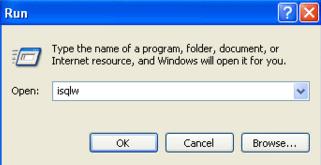
In SQL Server 2000, to launch Query Analyzer we ran the ISQLW shortcut. This essentially was the GUI equivelant of the ISQL console application.
SQL 2005
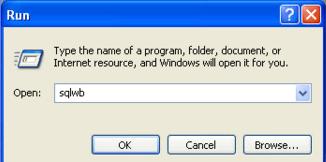
In SQL Server 2005, the Query Analyzer application and Enterprise Manager had their functionality merged into one application called "SQL Server Management Studio". One would figure that the shortcut for SQL Server 2005 would be SSMS or something. The shortcut is actually called SQLWB. For those that have played with some of the private old alphas of SQL Server 2005 (when it was still called Yukon) might remember that Management Studio was actually called SQL Server Workbench. That executable had remained SQLWB even though the product name got changed.
SQL 2008
In SQL Server 2008, FINALLY we have a standard shortcut. The shortcut now is SSMS; you guessed from the product name SQL Server Management Studio. This is not the most prolific feature inside SQL Server 2008, but I thought it is nice that finally the shortcut is standard with the long name of the product. There was someone in Microsoft who was probably asking himself the same thing "Why is the SQL Server Management Studio executable SQLWB?" nad finally decided to change it.

Concepts To Become A Silverlight Master (Series Part 4 - Security).aspx
Series Articles:
This article focuses on the topic of security and Silverlight. This is an abstract software development concept that every software developer should be aware of regardless of the environment in which they are developing. However, each environment is different and exposes different risks. Silverlight is no different. Furthermore, because of its architecture, Silverlight exposes some potential security holes. In this article I go over the security risks to consider in Silverlight, how a hacker can use several tools to extract desired information and what to do to protect your applications.
Silverlight Environment
Silverlight applications execute on the end user's workstation. This means the entire application and all the resources are brought down to the client and executed inside the client's environment. The Silverlight 2.0 application is brought down in an XAP file. An XAP file is a file that includes: xml configuration/manifest files, resource files (XAML, images) and of course your business logic which is a compiled assembly (dll). The XAP contains all these items because it is essentially a ZIP compressed file with a XAP extension. By default, the XAP file does not include any compression security. If you are a seasoned developer, this should immediately trigger some possible design concerns you would want to avoid.
If you are designing applications for the Silverlight environment, there are obviously some security precautions you will want to consider:
Securing Your Code & Protecting Intellectual Property
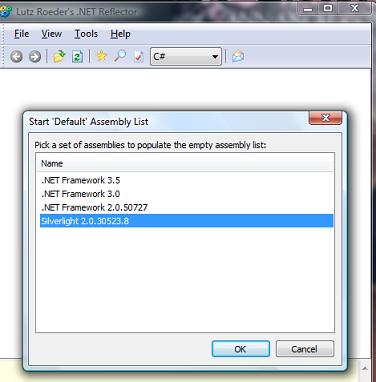
Just like the full .NET framework, the .NET 3.5 subset that runs Silverlight is managed code. The code is compiled in IL and can be very easily reverse engineered. A great tool for reverse engineering code (even Microsoft's own .NET Framework) is Reflector. A common solution to protect applications from other hackers or developers from easily reverse engineering code is obfuscation. Obfuscation will rename objects, fields, methods, etc., in your code to code that is a lot less readable. Remember, .NET doesn't care if a method in code is called "GetCustomers()". It can just as well be called "a()". This is just one example of obfuscation. Traditionally web developers that utilized web assemblies did not have to consider this, as the assembly never left the server (not always the case)
Reflector can disassemble Silverlight 2.0 assemblies
- As a best practice, if there is ultra sensitive code or some secret intellectual property, ensure that it is executed in its own domain on a server where you access the output through a service call. To be absolutely safe, do not place important business logic inside a Silverlight assembly that will be brought down to the client.
- In some cases, there are assemblies that either are not super sensitive or you have at least modest interest in protecting. In these situations, obfuscation is an ideal solution. The code can still be reverse engineered with time; however, it will take a more dedicated effort.
- Assemblies are not just vulnerable when they are executed or brought down to the client's workstation. Remember that assemblies can also be "picked off" during transit. For example, say you wrote a great application that is only available to users who have been authenticated through your web site. Inside the XAP file you include some sensitive information that is okay for the end user to look at. However, while in transit, this can still make the information inside your XAP file vulnerable. If you are concerned about the XAP package being intercepted, consider using https as a secure delivery mechanism to the client.
- Always make sure to sign the assemblies and provide the proper copyright information, especially if they are leaving the web server.
Isolated Storage (Protecting Sensitive Data)
Silverlight includes a concept called Isolated Storage, which can be viewed as large temporary storage mechanism ("cookies on steroids" is another term I saw on a blog recently). Isolated Storage utilizes three files to manage the contents of Isolated Storage and it is cleared when a user clears the browser cache. The files are well documented so a hacker who knows about Silverlight can easily access them. Furthermore, the contents of Isolated Storage are not secure and should not be assumed so.
- If you are persisting sensitive information on a client's workstation via Isolated Storage, consider obfuscating or encrypting the information. Information such as passwords or sensitive client data will probably warrant the use of the cryptography library inside .NET. Information such as a list of phone numbers might not warrant full-blown 128-bit encryption; however, obfuscating it with Base64 encoding might suffice. The choice is up to the developer to determine how sensitive the data is. However, when persisting data on the client, remember that the end user can always do something stupid and lose their laptop. You do not want to be the one responsible for writing an unsecured application that causes identity theft because someone lost their computer.
- Encrypting data on the client workstation exposes another issue to consider. Obviously, you cannot write encryption inside a Silverlight assembly for Isolated Storage and leave it wide open. A best practice would be to obfuscate the assembly that is used to encrypt the data. Another possible solution is to have the data encrypted through a service call and the encryption logic. More importantly, the key is never placed on the client.
- Remember, you cannot protect everything! (So don't even try to) Just like on the web, your graphic files, Javascript, HTML design are all exposed for everyone to access. Inside Silverlight, this applies to your XAML code and potentially your resource files.
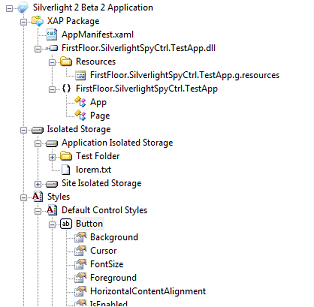
Silverlight Spy is a great program that "extracts" the UI information from the XAP file. Not only that, it can also peek into the Isolated Storage of a Silverlight application.
Secure Communication (Protecting Data in transit to a Silverlight Application)
Silverlight includes several communication mechanisms to retrieve data outside its application domain. The most popular mechanism is through service calls (Web Services). As I wrote in part 2 of the series, Silverlight has great integration with WCF. There are limitations though as to which bindings are supported. Since WCF is part of the .NET 3.0 Framework, a great deal of bindings are not supported simply because Silverlight runs on a subset of the full .NET framework.
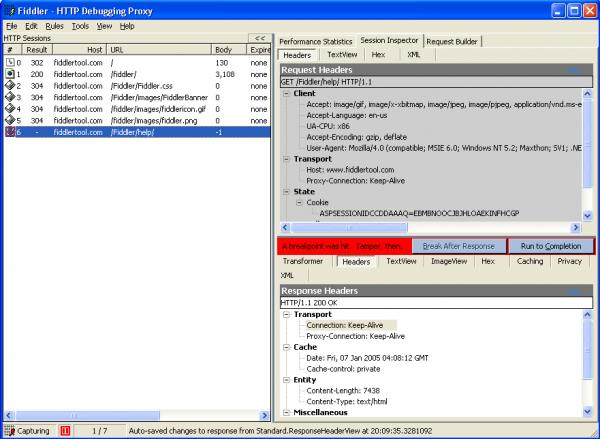
- One of the core bindings inside WCF is basicHttpBinding. This binding is largely around for backward compatibility and is usually avoided when designing enterprise based services with WCF. However, this binding is one of the few that Silverlight supports and will be used in Silverlight apps. BasicHttpBinding (unlike other WCF bindings) is, by default, unsecure. Therefore, the default communication mechanism will encode your message as clear text when using this binding. This maybe okay data that does not require secure transport. However, if it does, this binding should be made secure using https. For more information, watch this great video on some of the limitations of Silverlight/Https communication.
Fiddler is a great tool for inspecting message envelopes (peeking into unsecured web calls). Is your information exposed in clear text?
In general, designing services with best practice SOA guidance is not different for Silverlight consumers. I wanted to focus on WCF-BasicHttpBinding because there are a lot of examples using this binding with Silverlight and a lot of applications start from examples. The examples often don't mention that one of the drawbacks of the binding is that it defaults to an unsecured transport.
Isn't this just common sense?
All of the concepts listed above are essentially "best practices" regardless of which platform development is being done. Desktop applications have the same security concerns as Silverlight apps (local assemblies, access to temp/local files, etc). Web Services have the same security concerns as Silverlight consumed services.
- Silverlight is a new technology and many posts, articles and videos neglect to mention security implications in their examples. It is easy to get lost in all the options inside a new environment and lose focus on common design considerations (i.e., security).
- Silverlight is a unique plug-in model that runs on a subset of the .NET 3.5 framework on a client workstation. Services are typically your best bet of communicating with databases or outside the client app domain. These key features of Silverlight can sometimes be a trap to developers coming from other environments. Developers not familiar with plug-in architecture, WCF or just novices starting out with Silverlight can easily fall into a security trap and design an application with major security holes.
- There is some guidance on Enterprise level Silverlight applications and some articles on the web do focus on security. Right now this is limited; however, it should not be overlooked. Security is very important to consider during the design phase and even though there may be no formal "security best practice", you do not want to write a Silverlight application that is easy to breach.
- The tools I listed above: Silverlight Spy, Reflector and Fiddler are not just some hacker tools. Any serious developer should be using these tools to ensure their applications are written in the desired security model.