Ensure sure your Silverlight Beta 2 code works past this week!!!
Microsoft has released Silverlight 2 and will be making the Silverlight 2 RTM plug-in available to the masses. What does this mean? Any Silverlight version (Beta 1 and Beta 2) will be automatically upgraded to Silverlight 2 probably this week. Silverlight Beta 2 compiled assemblies will NOT WORK with Silverlight 2 RTM. This will most likely be fine for most people that simply were learning the Silverlight product. However, if you have a Beta 2 application in any form in production, live for demos, used by sales or have consulting clients, etc., you need to either upgrade your code or you're screwed, right? Not necesarily.
First, if you are in this boat, you have just learned the power of setting up an isolated demo environment (i.e., Virtual Appliance). If you do not have this luxury and can control some or all of the client machines, you can still prevent your beta 2 app from not working. Simply turn off the auto updates for Silverlight temporarily until you are ready to upgrade to Silverlight 2.
-
Right click on any Silverlight application and select "Silverlight Configuration"
-
Select the "Updates" Tab
-
Ensure that "Install Updates Automatically" is not checked
-
The option you chose here depends on the user or yourself. For example, you can set it to never update (then you have to make sure you don't forget to update to SL 2 RTM) or you can say prompt for updates, but you also want to make sure the user won't accidentaly click Yes. So either of these are fine.
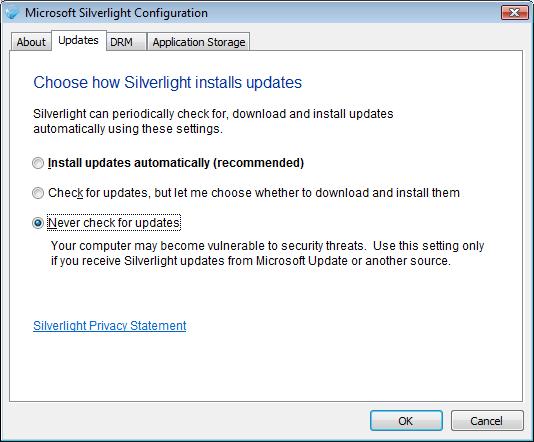
This will work great if you have an Intranet solution and control the machines. However, if you have a beta 2 application out for the masses (internet), there is no way this would work. This can buy you some time to get the application up to RTM standards and then simply tell your consumers to update the Silverlight plug-in.
Other tip: Before uninstalling beta 2/RC0 and go full force with RTM development, ensure you have the proper tools. Remember Expression Blend is not free, so you can either use your company's/personal MSDN subscription or it's time to purchase the software. You don't want to lock yourself into an upgrade nightmare. I also highly recommend Expression Design for prototyping.