Silverlight advantages over Flash (not another Silverlight vs Flash)
As I have been working with Silverlight over the last year, I came across many Silverlight vs Flash articles. Many of them are outdated and from last year (2007). Even entries from a couple of months ago (before Beta 1 or Beta 2) are essentially irrelevant.
I decided to write a (biased, obviously) post with some of the advantages Silverlight 2 Beta 2 currently has over Flash/Flex. Adobe Flash is much more mature of a product and has been around for over a decade now. A lot of the technology Macromedia/Adobe pioneered has simply been "copied/leveraged" by Microsoft. Even though this is the case, I am strictly going to focus on the aspects that make Silverlight 2 better than Flash.
-
Development IDE
-
The development IDE for Silverlight 2 is Visual Studio 2008. Bar none, Microsoft has the best development IDE on the market. Whether you are programming are a C++, C or Java programmer, you will learn to envy Visual Studio 2008. A lot of the items that I will post below can have constructive arguments. However, this is one of the few that is iron clad. There simply is NO comparison between Visual Studio 2008 and Adobe Flex Builder 3.
-
.NET Framework & Languages (C#, VB.NET and dynamic languages)
-
Silverlight 2 runs on a subset of the .NET 3.5 Framework. Therefore, it requires a the use of a .NET based language. The two flagship languages in .NET are C# and VB.NET. Flex uses ActionScript. If you are a .NET/Microsoft development department, you already have the majority of the skills necessary to start developing in Silverlight! That is a huge advantage over Adobe's counterpart. Silverlight also supports writing applications in dynamic languages such as Iron Ruby.
-
Intergration with Enterprise based technologies
- Perception as an RIA business framework
- Perception is everything. When I speak to other developers about Silverlight, they are generally very excited and motivated to learn the technology. Why? It essentially is very similar to Flash, which has been around for several years now. It is all about perception. For example, lets look at the iPhone when it launched last year (2007). Everyone and their mother lined up to get one, even though the phone was lacking major mobile technology that had been around for a couple years prior. Another example is VB.NET vs C#. VB.NET has always been looked as the red headed step child in .NET when compared to C#. C# has the perception of a more mature, professional and advanced language. This is where I think Silverlight has a huge perception/marketing edge. For creating business applications you will probably find it a lot more developers, architects and dev managers rallying around and more comfortable with Silverlight rather than Flex.
- Microsoft has Windows
- Like it or not, Microsoft still controls 85%+ of the desktop market. That percentage is even greater on business workstations. Even though Flash/Flex has a huge market lead now, Microsoft can simply put a monsterous dent in it by releasing Silverlight 2 RTM as a hotfix, part of a Service Pack or part of the next Windows release. Microsoft can simply distribute the Silverlight 2 RIA framework on a level no other company can. Many IT engineers will like Silverlight since it is a Microsoft based technology. It will make it a lot easier to distribute to their employees.
- Mesh
- Mesh right now is Microsoft's offering to sync up data between computers. It uses Silverlight as the UI. Unless you have been sleeping under a rock, you probably have heard Microsoft tried to buy Yahoo multiple times and tried to essentially buy their way into the search/advertising market. This is one area where since 1995 both Web 1.0 and Web 2.0 have both passed Microsoft by. Mesh is going to be Microsoft's big splash into Web 3.0 and the semantic web/cloud computing and allow them to compete with Google, Yahoo, FaceBook. What is great is that Silverlight is the UI for this huge "Internet 2" technology. If Mesh takes off (like a lot of people thing it will), Silverlight is going to be THE technology to know.
That's it? Notice I stayed away from topics like performance, XAML, codecs and all that. You will see many articles pointing one way and some in favor of the competing technology. I just wanted to list the main items that I think give Silverlight a clear edge over Flash/Flex. Not all of these items are current advantages. For example, items like Mesh have the potential to carry Silverlight as a first-class web technology. If you have any other key items to add, please comment below.
Update: I found this comment (from my comment section below) too funny. I wanted to post it up here. It's from James Cadd. I know it's not serious, but it just talks to the point I was trying to make about perception of Flash above: "I've been developing .NET business apps for 8 years now (since beta 1) and have found Silverlight very accessible. Keep in mind I do have WPF experience. But when I want to write some code in SL, not only do I know exactly what classes to look for, but I also bring with me the patterns I've used to develop with that specific set of classes for a long time now. The Flash people, of course, bring plenty of experience making animated images of monkeys swinging on trees ;)"
Silverlight 2 Tools, SQL Server 2008 and Visual Studio 2008 SP1 Installed & Working Together
This article goes over the steps needed to:
- Install SQL Server 2008, Visual Studio 2008 SP1 and Silverlight 2 Beta 2 together
- Install Visual Studio 2008 SP1 & Silverlight 2 Beta 2 together
- Items to remove if you had: SQL Server 2008 Beta/RC or Visual Studio 2008 SP1 Beta installed
Last week Microsoft released SQL Server 2008. SQL Server 2008 includes several tools and services that require .NET 3.5 Service Pack 1. The redistributable is included with the SQL Server 2008 installation. However, this caused problems with workstations that had Visual Studio 2008 installed. Visual Studio 2008 could not work with .NET 3.5 SP1 as it ran on the original .NET 3.5 version. This was the first thing I ran into when I installed SQL Server 2008 last week. This is all detailed in the Microsoft Help & Support section here:
http://support.microsoft.com/kb/956139
The second issue is that even if Visual Studio worked, the Silverlight tools for .NET 3.1 SP1 were not released. So I ended up uninstalling SQL Server 2008 and putting off my upgrade on all my workstations/servers. Today (8/11/2008) Microsoft released several tools in order for developers to install Silverlight, SQL Server 2008 and Visual Studio 2008 SP1 on a single workstation.
Before we get started, this is what you will need in order to compete the installation. Please note these items, as upgrading your workstation to this environment can take some time:
-
Depending on your workstation (processor/network connection), this can take well more than a couple of hours to set up.
-
Plan for 2-5 hours of non-continous time (you click install and browse the internet while it installs)
-
The more beta items you have installed the more complex the process will be
-
SQL Server 2008 has a new installation process. It helps to familiarize yourself with it before going any further
-
Visual Studio 2008 installed or CD (possibly need the CD media, more on that later)
-
Downlad the Visual Studio Patch Removal Tool (ISO file)
-
Download the Visual Studio 2008 Service Pack 1
-
Download the Silverlight 2 Beta 2 Tools for VS 2008 SP1
-
SQL Server 2008 (Download from MSDN, if you have a subscription) (ISO file)
-
Extract the ISO files:
-
Below are three scenarios listed. These should be done in the order noted below; Otherwise, you could run into problems. Specifically, SQL Server 2008 HAS to be installed after Visual Studio 2008 and Visual Studio 2008 SP1 (exception noted below):
On a 100% clean workstation, follow these steps:
- Install Visual Studio 2008
- Install Visual Studio 2008 Service Pack 1
- After the installation, it will prompt you for a reboot. If you are planning to install the Silverlight Tools, ignore the reboot and Install the Silverlight Tools. If not installing the Silverlight Tools, reboot the workstation
- Install Silverlight 2 Beta 2 Tools for VS 2008 SP1
- Reboot (If you do not reboot, you will receive weird errors that say the SP1 or Silverlight Tools are not installed)
- Install SQL Server 2008
On a workstation that has Visual Studio 2008 and NEVER had Silverlight Tools installed, SQL Server 2008 Beta/RC, .NET 3.5 SP1 Beta, follow these steps:
- Install Visual Studio 2008 Service Pack 1
- After the installation, it will prompt you for a reboot. If you are planning to install the Silverlight Tools, ignore the reboot and Install the Silverlight Tools. If not installing the Silverlight Tools, reboot the workstation
- Install Silverlight 2 Beta 2 Tools for VS 2008 SP1
- Reboot (If you do not reboot, you will receive weird errors that say the SP1 or Silverlight Tools are not installed)
- Install SQL Server 2008
On a workstation that has Visual Studio 2008 and you installed any of these items: SQL Server 2008 Beta/RC, VS 2008 SP 1 Beta or Silverlight Beta 2 Tools for VS 2008
- Uninstall SQL Server 2008 Beta/RC0 (if applicable)
- This includes all the components (.NET 3.5 Beta 1, SQL Server 2008 Browser, Support Files, etc.)
- Uninstall Visual Studio 2008 SP1 Beta 1 (DO NOT uninstall Visual Studio 2008)
- Uninstall Silverlight 2 Beta 2 Tools for VS 2008
- Run the Visual Studio Patch Removal Tool
- This tool will remove any VS 2008 SP1 Beta files remaining on the workstation and ensure you can install VS SP1
- This may require you to have your VS 2008 media (CD) handy
- Check out Heath Stewart's blog for more details
-
Install Visual Studio 2008 Service Pack 1
-
After the installation it, will prompt you for a reboot. If you are planning to install the Silverlight Tools, ignore the reboot and Install the Silverlight Tools. If not installing the Silverlight Tools, reboot the workstation
-
Install Silverlight 2 Beta 2 Tools for VS 2008 SP1
-
Reboot (If you do not reboot, you will receive weird errors that say the SP1 or Silverlight Tools are not installed)
- Install SQL Server 2008
You technically do not have to install SQL 2008 last. However, it makes your life much easier if you do. You can do this:
- ...
- Install SQL Sever 2008 (Only install components of SQL Server 2008 that do not require Visual Studio 2008.) Do NOT select the following features:
- Management Tools (Basic or Complete)
- Integration Services
- Business Intelligence Development Studio
- Install VS 2008 SP1
- ....
- Install the missing components for SQL Server 2008 that you omited (SSMS, Intergration Services, BIDS)
This is NOT recommended, but possible. I figured I would post this in case someone else tried that scenario.
- All of your existing VS 2008 projects will open normally. There is no "conversion/upgrade" required
- I tried a couple of big Silverlight 2 Beta 2 projects and they transferred seamlessly
- Note: apparently ADO.NET Data Services in SQL Server 2008 currently do not work with Silverlight 2 Beta 2
- If you have any problems, feel free to post/email them to me
Concepts To Become A Silverlight Master (Series Part 4 - Security).aspx
Series Articles:
This article focuses on the topic of security and Silverlight. This is an abstract software development concept that every software developer should be aware of regardless of the environment in which they are developing. However, each environment is different and exposes different risks. Silverlight is no different. Furthermore, because of its architecture, Silverlight exposes some potential security holes. In this article I go over the security risks to consider in Silverlight, how a hacker can use several tools to extract desired information and what to do to protect your applications.
Silverlight Environment
Silverlight applications execute on the end user's workstation. This means the entire application and all the resources are brought down to the client and executed inside the client's environment. The Silverlight 2.0 application is brought down in an XAP file. An XAP file is a file that includes: xml configuration/manifest files, resource files (XAML, images) and of course your business logic which is a compiled assembly (dll). The XAP contains all these items because it is essentially a ZIP compressed file with a XAP extension. By default, the XAP file does not include any compression security. If you are a seasoned developer, this should immediately trigger some possible design concerns you would want to avoid.
If you are designing applications for the Silverlight environment, there are obviously some security precautions you will want to consider:
Securing Your Code & Protecting Intellectual Property
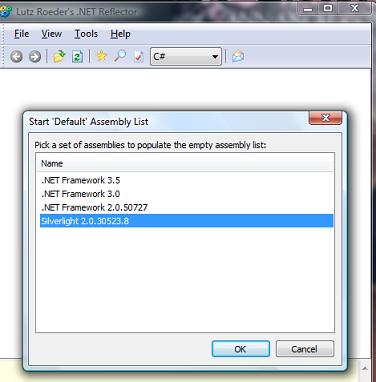
Just like the full .NET framework, the .NET 3.5 subset that runs Silverlight is managed code. The code is compiled in IL and can be very easily reverse engineered. A great tool for reverse engineering code (even Microsoft's own .NET Framework) is Reflector. A common solution to protect applications from other hackers or developers from easily reverse engineering code is obfuscation. Obfuscation will rename objects, fields, methods, etc., in your code to code that is a lot less readable. Remember, .NET doesn't care if a method in code is called "GetCustomers()". It can just as well be called "a()". This is just one example of obfuscation. Traditionally web developers that utilized web assemblies did not have to consider this, as the assembly never left the server (not always the case)
Reflector can disassemble Silverlight 2.0 assemblies
- As a best practice, if there is ultra sensitive code or some secret intellectual property, ensure that it is executed in its own domain on a server where you access the output through a service call. To be absolutely safe, do not place important business logic inside a Silverlight assembly that will be brought down to the client.
- In some cases, there are assemblies that either are not super sensitive or you have at least modest interest in protecting. In these situations, obfuscation is an ideal solution. The code can still be reverse engineered with time; however, it will take a more dedicated effort.
- Assemblies are not just vulnerable when they are executed or brought down to the client's workstation. Remember that assemblies can also be "picked off" during transit. For example, say you wrote a great application that is only available to users who have been authenticated through your web site. Inside the XAP file you include some sensitive information that is okay for the end user to look at. However, while in transit, this can still make the information inside your XAP file vulnerable. If you are concerned about the XAP package being intercepted, consider using https as a secure delivery mechanism to the client.
- Always make sure to sign the assemblies and provide the proper copyright information, especially if they are leaving the web server.
Isolated Storage (Protecting Sensitive Data)
Silverlight includes a concept called Isolated Storage, which can be viewed as large temporary storage mechanism ("cookies on steroids" is another term I saw on a blog recently). Isolated Storage utilizes three files to manage the contents of Isolated Storage and it is cleared when a user clears the browser cache. The files are well documented so a hacker who knows about Silverlight can easily access them. Furthermore, the contents of Isolated Storage are not secure and should not be assumed so.
- If you are persisting sensitive information on a client's workstation via Isolated Storage, consider obfuscating or encrypting the information. Information such as passwords or sensitive client data will probably warrant the use of the cryptography library inside .NET. Information such as a list of phone numbers might not warrant full-blown 128-bit encryption; however, obfuscating it with Base64 encoding might suffice. The choice is up to the developer to determine how sensitive the data is. However, when persisting data on the client, remember that the end user can always do something stupid and lose their laptop. You do not want to be the one responsible for writing an unsecured application that causes identity theft because someone lost their computer.
- Encrypting data on the client workstation exposes another issue to consider. Obviously, you cannot write encryption inside a Silverlight assembly for Isolated Storage and leave it wide open. A best practice would be to obfuscate the assembly that is used to encrypt the data. Another possible solution is to have the data encrypted through a service call and the encryption logic. More importantly, the key is never placed on the client.
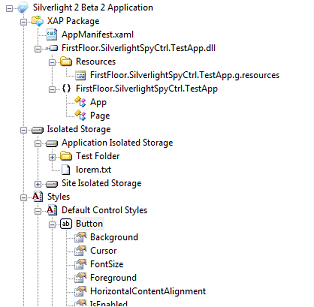
- Remember, you cannot protect everything! (So don't even try to) Just like on the web, your graphic files, Javascript, HTML design are all exposed for everyone to access. Inside Silverlight, this applies to your XAML code and potentially your resource files.
Silverlight Spy is a great program that "extracts" the UI information from the XAP file. Not only that, it can also peek into the Isolated Storage of a Silverlight application.
Secure Communication (Protecting Data in transit to a Silverlight Application)
Silverlight includes several communication mechanisms to retrieve data outside its application domain. The most popular mechanism is through service calls (Web Services). As I wrote in part 2 of the series, Silverlight has great integration with WCF. There are limitations though as to which bindings are supported. Since WCF is part of the .NET 3.0 Framework, a great deal of bindings are not supported simply because Silverlight runs on a subset of the full .NET framework.
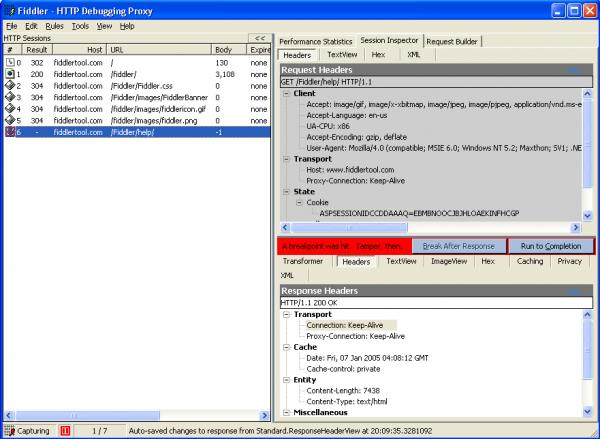
- One of the core bindings inside WCF is basicHttpBinding. This binding is largely around for backward compatibility and is usually avoided when designing enterprise based services with WCF. However, this binding is one of the few that Silverlight supports and will be used in Silverlight apps. BasicHttpBinding (unlike other WCF bindings) is, by default, unsecure. Therefore, the default communication mechanism will encode your message as clear text when using this binding. This maybe okay data that does not require secure transport. However, if it does, this binding should be made secure using https. For more information, watch this great video on some of the limitations of Silverlight/Https communication.
Fiddler is a great tool for inspecting message envelopes (peeking into unsecured web calls). Is your information exposed in clear text?
In general, designing services with best practice SOA guidance is not different for Silverlight consumers. I wanted to focus on WCF-BasicHttpBinding because there are a lot of examples using this binding with Silverlight and a lot of applications start from examples. The examples often don't mention that one of the drawbacks of the binding is that it defaults to an unsecured transport.
Isn't this just common sense?
All of the concepts listed above are essentially "best practices" regardless of which platform development is being done. Desktop applications have the same security concerns as Silverlight apps (local assemblies, access to temp/local files, etc). Web Services have the same security concerns as Silverlight consumed services.
- Silverlight is a new technology and many posts, articles and videos neglect to mention security implications in their examples. It is easy to get lost in all the options inside a new environment and lose focus on common design considerations (i.e., security).
- Silverlight is a unique plug-in model that runs on a subset of the .NET 3.5 framework on a client workstation. Services are typically your best bet of communicating with databases or outside the client app domain. These key features of Silverlight can sometimes be a trap to developers coming from other environments. Developers not familiar with plug-in architecture, WCF or just novices starting out with Silverlight can easily fall into a security trap and design an application with major security holes.
- There is some guidance on Enterprise level Silverlight applications and some articles on the web do focus on security. Right now this is limited; however, it should not be overlooked. Security is very important to consider during the design phase and even though there may be no formal "security best practice", you do not want to write a Silverlight application that is easy to breach.
- The tools I listed above: Silverlight Spy, Reflector and Fiddler are not just some hacker tools. Any serious developer should be using these tools to ensure their applications are written in the desired security model.
Silverlight 2.0 - Concepts To Become A Silverlight Master (Series Part 3 - Blend)
Series Articles:
In order to get a better understanding of how Silverlight applications are designed from a UI perspective, let's take quick look at the Silverlight architecture.
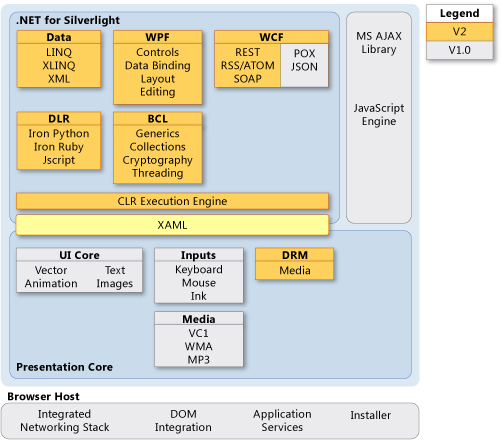
Notice under the WPF Heading listed are Controls, Data Binding, Layout & Editing. You might be wondering, why does this say WPF? The reason is Silverlight essentially leverages a subset of WPF technology (some parts are different) for the items mentioned. Before it was branded with the term Silverlight, it was actually known as WPF/E. Therefore, one can see that Silverlight has its roots in WPF. Furthermore, note how the WPF technology stack replaced the UI Core in Silverlight 1.0. WPF has been around since 2006, when .NET 3.0 was released. However, WPF adoption has been slowed because of poor UI tool support. In Visual Studio 2005, it was complete mess to try to write a WPF solution. Improved WPF support was finally added in VS 2008 (more is coming in .NET 3.5 sp1). However, Microsoft realized that in order to create rich/interactive applications, a first-class design tool was needed. This is how the Blend product came to be.
The Blend product is part of Microsoft's Expression Studio, which is a collection of first-class design tools. Microsoft Blend is a design tool that makes creating & editing XAML-based applications easy. Both WPF & Silverlight use XAML to declaratively control the controls, binding, styles, animations, etc., for the UI. Visual Studio is a great development IDE and has some basic design features. However, adding a full-blown designer inside the VS shell would have had poor results. Blend has been created with the designer in mind and the latest version(s) are actually written inside WPF! Expression Studio is a much needed application. Microsoft is competing primarily with Adobe AIR/Flex products. While Microsoft has the developer tools on its side (Visual Studio, C#, WCF, etc.), Adobe is the gold standard for graphical applications. Because Adobe products such as Flash, Illustrator, PhotoShop, etc., are tightly integrated and provide a designer first-class tools, Microsoft needed a strong design suite of their own.
Seperating Blend into its own product allows graphic designers to create/layout/style the application while the developer focuses on the code/data communication, etc. However, in order for this to happen, Microsoft had to leverage the ability of XAML to declaratively control layout, data binding, styling, templating, resource management, etc., inside Blend. Simply creating a second product and saying this is for designers and Visual Studio is for developers would not go over well! I think of it this way: Wherein some IT shops, DBAs are the only ones to touch the database and app developers only touch the the code. Except inside Blend, the seperation is the XAML/UI from the code behind. Hopefully, this makes sense as to why Microsoft decided to seperate the heavy design operations to another product.
By now you are probably asking yourself: So what can Blend do for me?
- Currently the Silverlight 2.0 SDK adds very little design support inside Visual Studio 2008. A developer can definitely lay out a simple application; however, harnessing the true power of Silverlight with animations/effects/styles/templating is not all there. As I mentioned above, I don't believe this will change in the RTM for the simple fact that it would be a real mess to try to add all the tools that Blend provides inside the VS shell.
- Silverlight 2.0 uses Blend 2.5 (This might change when the RTM version comes out) and this gives Silverlight 2.0 first-class design support for layouts, controls, animations, styling, templates and resource management. All these items that a developer would normally have to code by hand inside XAML are done for you simply using the Blend product.
- Blend has excellent integration with Visual Studio 2008. A developer can write a piece of code, jump to Blend, add a new control/user control and jump right back into Visual Studio and add some code behind. This is all done very seamlessly and the integration is fantastic. Blend can even build the entire Silverlight solution and perform test runs inside Blend as well! Even as of Beta 2, this integration is first class and I cannot stress the power of this feature enough.
- Blend is much more than just dragging and dropping a button and changing a color or a brush. The true power of Blend comes with the ability to spice up an application with animation/transitions/styles quickly giving a Silverlight applications that fluid/liquid interface that many compare to the iPhone for example. Blend does this by using a set of tools that expose XAML functionality (Remember, Blend just writes XAML). For example, creating a new button that looks completely different but behaves like a button is straightforward or attaching a set of transitions for mouse events is easy simple. These kind of additions not only make the UI look modern but can add visual queues, emphasis, enhanced spacial layout that were harder to do but add greater value to the application.
- Blend is not just for a designer. Not every IT department is going to have a dedicated designer able to strictly focus on pretty designs. I am not a designer. However, I dabbled with PhotoShop, GIMP, etc., and I could not do much beyond the tutorial I was using. Blend makes creating a first-class design clear once you have a good understanding of the capabilities of the product. The product definitely has the designer in mind; however, even a developer can use it and extend a Silverlight design.
- Creating advanced custom controls usually has been left to 3rd party libraries. Furthermore, creating professional looking controls demanded knowledge of GDI+ (which wasn't easy). Creating professional custom controls/user controls has never been easier with Blend. Personally, I have created simple mashup controls to pretty complex grid controls and it was actually pretty fun. In my opinion, Blend is really going to give some of the 3rd party controls a run for their money in Silverlight 2.0. The tools inside Blend drop the learning curve signifigantly for creating custom controls.
- Blend essentially gives you the tools to bring Silverlight applications to life and to design Silverlight applications using best practices for future enhancements, data binding, templates, etc.
From the list above, one can see that Expression Blend does a lot for you! This is why I feel it is a must, even for a developer, to learn Blend real well (unless you are the sadistic kind and like to crack open Notepad and hack XAML). Understanding Blend will allow a developer or a designer to bring their applications to life and harness the full power of Silverlight.